 Blog's Page
 Blog's Page
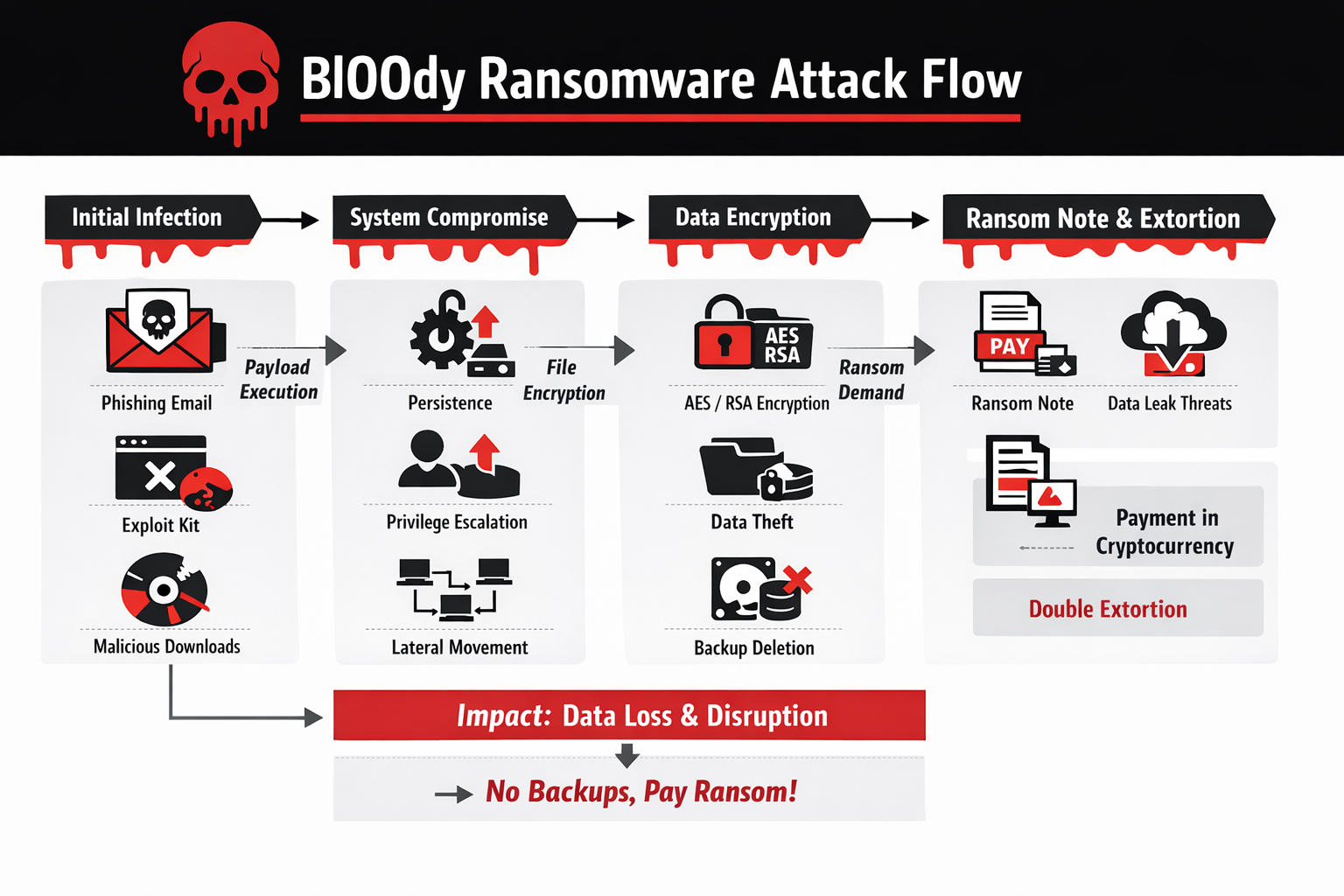
Bl00dy Ransomware Is An Emerging Strain Of Crypto-ransomware That Has Gained Attention In The Cybersecurity Community Due To Its Aggressive Encryption Techniques, Stealthy Infiltration Methods, And Increasing Use In Targeted Cybercrime Campaigns. Like Other Modern Ransomware Families, Bl00dy Is Designed To Extort Money From Victims By Encrypting Critical Files And Demanding Payment, Usually In Cryptocurrency, In Exchange For A Decryption Key.
What Makes Bl00dy Particularly Dangerous Is Its Combination Of Social Engineering, Exploit-based Delivery, And Post-infection Persistence Strategies That Enable It To Spread Quickly Within Organizational Networks. As Ransomware Continues To Evolve Into A Sophisticated Cybercrime Business Model, Understanding Threats Like Bl00dy Is Essential For Both Individuals And Enterprises.
Bl00dy Ransomware Typically Enters Systems Through Multiple Attack Vectors, Most Commonly Phishing Emails, Malicious Attachments, Compromised Websites, And Cracked Software Installers. Attackers Often Disguise Malicious Payloads As Legitimate Documents Such As Invoices, Job Applications, Shipping Notices, Or Government Notifications.
These Emails Are Carefully Crafted To Induce Urgency Or Fear, Encouraging Victims To Open Attachments Or Click Links. Once The Malicious File Is Executed, The Ransomware Payload Is Silently Installed In The Background, Often Without Any Visible Signs Until Encryption Begins. In Some Campaigns, Bl00dy Has Also Been Distributed Via Exploit Kits That Target Unpatched Vulnerabilities In Browsers, Plugins, And Operating Systems.
After Initial Execution, Bl00dy Ransomware Establishes Persistence On The Infected Machine To Ensure That It Remains Active Even After System Reboots. This Is Typically Achieved By Modifying Windows Registry Entries, Creating Scheduled Tasks, Or Placing Malicious Executables In Startup Directories.
In Enterprise Environments, Attackers May Deploy Additional Tools To Escalate Privileges And Move Laterally Across The Network, Enabling The Ransomware To Infect Shared Drives, File Servers, And Backup Repositories. This Network-aware Behavior Significantly Increases The Scale Of Damage And Raises Recovery Costs For Organizations.
The Encryption Process Used By Bl00dy Ransomware Is Based On Strong Cryptographic Algorithms, Commonly Combining Symmetric Encryption Such As AES With Asymmetric Encryption Such As RSA Or ECC. During Infection, The Ransomware Generates A Unique Encryption Key For Each Victim Or Device, Which Is Then Encrypted Using The Attacker’s Public Key And Sent To A Remote Command-and-control Server.
This Design Ensures That Decryption Without The Private Key Is Computationally Infeasible, Making File Recovery Extremely Difficult Without Backups. Encrypted Files Are Typically Renamed With A Distinctive Extension, Allowing Victims To Quickly Identify Affected Data, Although The Exact Extension May Vary Across Campaigns.
Once Encryption Is Complete, Bl00dy Ransomware Displays A Ransom Note On The Desktop And In Affected Directories. The Ransom Message Informs Victims That Their Files Are Locked And Provides Instructions For Purchasing Cryptocurrency, Usually Bitcoin Or Monero, To Pay The Ransom.
The Note Often Includes A Countdown Timer And Threats That The Decryption Key Will Be Deleted If Payment Is Not Made Within A Specified Timeframe. Some Versions Of Bl00dy Also Threaten To Leak Stolen Data Publicly, Indicating The Use Of Double Extortion Tactics Where Attackers Both Encrypt Files And Exfiltrate Sensitive Information Before Encryption.
The Financial And Operational Impact Of Bl00dy Ransomware Attacks Can Be Devastating. For Individuals, Loss Of Personal Photos, Documents, And Academic Work Can Be Emotionally Distressing And Sometimes Irreversible. For Businesses, The Consequences Include Downtime, Loss Of Customer Trust, Regulatory Penalties, And High Recovery Costs.
In Sectors Such As Healthcare, Education, Manufacturing, And Government, Ransomware Attacks Can Disrupt Essential Services, Leading To Broader Societal Consequences. Even When Organizations Choose To Pay The Ransom, There Is No Guarantee That Files Will Be Fully Restored Or That Attackers Will Not Strike Again.
Bl00dy Ransomware Operators Often Employ Affiliate-based Distribution Models, Where Multiple Threat Actors Are Allowed To Deploy The Ransomware In Exchange For Sharing Profits With The Core Developers. This Ransomware-as-a-service (RaaS) Approach Accelerates The Spread Of The Malware And Increases The Diversity Of Attack Techniques. Affiliates May Use Their Own Phishing Kits, Exploit Frameworks, Or Access Brokers Who Sell Compromised Credentials To Corporate Networks. This Ecosystem Makes Attribution Difficult And Enables Rapid Evolution Of Tactics To Evade Detection.
To Avoid Detection By Antivirus And Endpoint Protection Systems, Bl00dy Ransomware Frequently Uses Obfuscation, Packing, And Fileless Execution Techniques. The Payload May Be Encrypted Or Compressed To Evade Signature-based Detection, And In Some Cases Executed Directly In Memory Using PowerShell Or Windows Management Instrumentation (WMI).
These Techniques Reduce The Likelihood That Traditional Security Tools Will Identify The Malware Before It Completes Encryption. Advanced Versions May Also Disable Security Services, Terminate Backup Processes, And Delete Shadow Copies To Prevent Easy System Restoration.
Backup Destruction Is A Critical Component Of Bl00dy Ransomware’s Strategy. By Deleting Volume Shadow Copies And Targeting Network Backups, Attackers Aim To Eliminate Recovery Options And Increase The Probability That Victims Will Pay The Ransom. Some Campaigns Also Search For Cloud Backup Synchronization Folders And Attempt To Encrypt Synchronized Files, Extending Damage Beyond The Local Machine. This Highlights The Importance Of Maintaining Offline Or Immutable Backups That Cannot Be Modified By Malware.
Incident Response To Bl00dy Ransomware Requires Immediate Containment And Forensic Analysis. Infected Machines Should Be Isolated From The Network To Prevent Further Spread. Security Teams Must Identify Patient Zero, Analyze Log Files, And Determine Whether Data Exfiltration Occurred. Restoring From Clean Backups Is The Preferred Recovery Method, Provided That Backup Systems Were Not Compromised. In Cases Where Backups Are Unavailable, Victims May Attempt File Recovery Using Forensic Tools, But Success Is Limited Due To Strong Encryption Algorithms.
From A Legal And Ethical Perspective, Paying Ransom Remains Controversial. While Payment May Appear To Be The Fastest Way To Restore Operations, It Funds Criminal Enterprises And Encourages Further Attacks. Some Jurisdictions Discourage Or Even Prohibit Ransom Payments, Particularly When They May Violate Sanctions Regulations.
Furthermore, There Is No Assurance That Attackers Will Provide Functional Decryption Tools Or Refrain From Selling Stolen Data. Therefore, Cybersecurity Experts Consistently Recommend Focusing On Prevention, Preparedness, And Recovery Planning Rather Than Ransom Negotiation.
Preventing Bl00dy Ransomware Infections Begins With Strong Cybersecurity Hygiene. Regular Patching Of Operating Systems, Browsers, And Applications Is Essential To Close Vulnerabilities Exploited By Malware. Email Security Gateways And Spam Filters Can Significantly Reduce Exposure To Phishing Campaigns, While Endpoint Detection And Response (EDR) Solutions Can Identify Suspicious Behaviors Such As Unauthorized Encryption Activity. Network Segmentation Also Limits The Ability Of Ransomware To Spread Laterally Across Systems.
User Awareness Training Plays A Crucial Role In Ransomware Defense. Employees Should Be Educated To Recognize Phishing Indicators Such As Unexpected Attachments, Spelling Errors, Spoofed Sender Addresses, And Urgent Requests For Action. Simulated Phishing Exercises Help Reinforce Safe Behavior And Reduce The Likelihood Of Accidental Malware Execution. Since Social Engineering Remains The Most Common Infection Vector, Human Vigilance Is As Important As Technical Controls.
Backup Strategies Must Follow The 3-2-1 Rule: Three Copies Of Data Stored On Two Different Media Types With At Least One Copy Kept Offline Or Offsite. Immutable Backups, Which Cannot Be Altered Or Deleted For A Defined Period, Provide Strong Protection Against Ransomware. Regular Testing Of Backup Restoration Procedures Ensures That Recovery Can Be Performed Quickly During An Incident. Without Reliable Backups, Organizations Are Left With Limited And Risky Options After An Attack.
Advanced Security Measures Such As Application Whitelisting, Privilege Management, And Behavior-based Monitoring Further Reduce Ransomware Risk. Restricting Administrative Privileges Prevents Malware From Making System-wide Changes, While Application Control Limits Execution Of Unauthorized Software. Network Traffic Monitoring Can Detect Connections To Known Command-and-control Servers, Enabling Early Detection Of Infection Attempts.
Threat Intelligence Sharing And Proactive Monitoring Also Contribute To Effective Defense Against Bl00dy Ransomware. By Tracking Indicators Of Compromise Such As Malicious IP Addresses, File Hashes, And Phishing Domains, Organizations Can Block Known Threats Before They Reach Users. Collaboration Between Industry Groups, CERT Teams, And Law Enforcement Agencies Improves Situational Awareness And Supports Coordinated Responses To Emerging Ransomware Campaigns.
From A Research Perspective, Bl00dy Ransomware Illustrates Broader Trends In Modern Cybercrime, Including Automation, Monetization, And Professionalization Of Attack Infrastructure. Developers Continuously Refine Encryption Routines, Distribution Methods, And Evasion Techniques To Stay Ahead Of Defensive Technologies. This Cat-and-mouse Dynamic Underscores The Need For Continuous Investment In Cybersecurity Research, Workforce Training, And Public Awareness Initiatives.
In Academic And Professional Cybersecurity Curricula, Ransomware Case Studies Like Bl00dy Provide Valuable Insights Into Real-world Attack Chains, From Initial Access To Impact And Recovery. Analyzing These Stages Helps Students And Practitioners Understand How Technical Vulnerabilities Intersect With Human Behavior And Organizational Processes. Such Holistic Understanding Is Essential For Designing Effective Security Architectures And Response Strategies.
Looking Ahead, Ransomware Threats Are Expected To Become More Targeted And Destructive, With Increased Use Of Artificial Intelligence, Automation, And Supply Chain Attacks. Bl00dy Ransomware Represents Not Just A Single Malware Family But A Reflection Of Evolving Criminal Ecosystems That Adapt Quickly To Defensive Improvements. Future Variants May Incorporate Faster Encryption, Deeper Persistence Mechanisms, And More Aggressive Data Theft Techniques.
In Conclusion, Bl00dy Ransomware Is A Serious And Evolving Cyber Threat That Demonstrates The Complexity Of Modern Ransomware Operations. Its Multi-stage Infection Process, Strong Encryption Methods, And Double Extortion Tactics Make It A Significant Risk To Individuals And Organizations Alike. While Technical Defenses Are Essential, True Resilience Against Ransomware Requires A Combination Of Secure System Configurations, Regular Backups, Continuous Monitoring, And Informed Users.
By Adopting A Layered Security Approach And Maintaining Proactive Preparedness, Victims Can Significantly Reduce The Likelihood Of Successful Attacks And Minimize Damage When Incidents Occur. Ultimately, Combating Ransomware Like Bl00dy Requires Collective Effort From Technology Providers, Policymakers, Researchers, And End Users To Build A Safer Digital Ecosystem.
Step 1: Boot Into Safe Mode
Restart Your PC And Press F8 (or Shift + F8 For Some Systems) Before Windows Loads.
Choose Safe Mode With Networking.
Safe Mode Prevents Most Malware From Loading.
Press Win + R, Type appwiz.cpl, And Press Enter.
Sort By Install Date And Uninstall Unknown Or Recently Added Programs.
Use A Trusted Anti-malware Tool:
Malwarebytes – https://www.malwarebytes.com
Screenshot Of Malwarebytes - Visit Links
Microsoft Defender – Built Into Windows 10/11
HitmanPro, ESET Online Scanner, Or Kaspersky Virus Removal Tool
ZoneAlarm Pro Antivirus + Firewall NextGen
VIPRE Antivirus - US And Others Countries, | India
Run A Full Scan And Delete/quarantine Detected Threats.
Win + R, Type temp → Delete All Files.Press Win + R, Type %temp% → Delete All Files.
Use Disk Cleanup: cleanmgr In The Run Dialog.
Go To: C:\Windows\System32\drivers\etc
Open hosts File With Notepad.
Replace With Default Content:
Press Ctrl + Shift + Esc → Open Task Manager
Go To Startup Tab
Disable Any Suspicious Entries.
Open Command Prompt As Administrator.
Run These Commands:
netsh Winsock Reset

netsh Int Ip Reset

ipconfig /flushdns
Unwanted Homepage Or Search Engine
Pop-ups Or Redirects
Unknown Extensions Installed
For Chrome:
Go To: chrome://extensions/
Remove Anything Unfamiliar
For Firefox:
Go To: about:addons → Extensions
Remove Suspicious Add-ons
For Edge:
Go To: edge://extensions/
Uninstall Unknown Add-ons
Chrome:
Go To chrome://settings/reset → "Restore Settings To Their Original Defaults"
Firefox:
Go To about:support → "Refresh Firefox"
Edge:
Go To edge://settings/resetProfileSettings → "Reset Settings"
All Browsers:
Use Ctrl + Shift + Del → Select All Time
Clear Cookies, Cached Files, And Site Data
Make Sure They Are Not Hijacked.
Chrome: chrome://settings/search
Firefox: about:preferences#search
Edge: edge://settings/search
Chrome: chrome://settings/cleanup
Use Malwarebytes Browser Guard For Real-time Browser Protection.
Always Download Software From Trusted Sources.
Keep Windows, Browsers, And Antivirus Updated.
Avoid Clicking Suspicious Links Or Ads.
Use ad Blockers And reputable Antivirus Software.
Backup Your Files Regularly.
To Remove Malware From Your Windows PC, Start By Booting Into Safe Mode, Uninstalling Suspicious Programs, And Scanning With Trusted Anti-malware Tools Like Malwarebytes. Clear Temporary Files, Reset Your Network Settings, And Check Startup Apps For Anything Unusual.
For web Browsers, Remove Unwanted Extensions, Reset Browser Settings, Clear Cache And Cookies, And Ensure Your Homepage And Search Engine Haven’t Been Hijacked. Use Cleanup Tools Like Chrome Cleanup Or Browser Guard For Added Protection.
?? Prevention Tips: Keep Software Updated, Avoid Suspicious Downloads, And Use Antivirus Protection Plus Browser Ad Blockers. Regular Backups Are Essential.
Why It Matters: Not All VPNs Offer Malware Protection.
What To Look For: Providers With built-in Malware/ad/tracker Blockers (e.g., NordVPN’s Threat Protection, ProtonVPN’s NetShield).
Purpose: Prevents Data Leaks If Your VPN Connection Drops.
Benefit: Ensures Your Real IP And Browsing Activity Aren’t Exposed To Malware-distributing Websites.
Why It Matters: DNS Leaks Can Expose Your Online Activity To Attackers.
Solution: Enable DNS Leak Protection In Your VPN Settings Or Use A Secure DNS Like Cloudflare (1.1.1.1).
Risk: Free VPNs Often Contain Malware, Sell User Data, Or Lack Security Features.
Better Option: Use Reputable Paid VPNs That Offer security Audits And Transparent Privacy Policies.
Some VPNs Block Known Phishing And Malicious Sites.
Example: Surfshark’s CleanWeb, CyberGhost’s Content Blocker.
Reason: Security Patches Fix Known Vulnerabilities.
Tip: Enable Auto-updates Or Check For Updates Weekly.
Scope: Malware Can Enter Through Phones, Tablets, Or IoT Devices.
Solution: Install VPN Apps On Every Internet-connected Device.
Fact: VPNs Do Not Remove Or Detect Malware On Your System.
Complement It With:
Antivirus Software
Firewall
Browser Extensions For Script Blocking
VPN Encrypts Traffic But Can’t Stop Malware From Executing If You Download Infected Files.
Split Tunneling Allows Certain Apps/sites To Bypass VPN.
Tip: Never Exclude Browsers, Email Clients, Or Download Managers From VPN Tunneling.
A VPN (Virtual Private Network) Enhances Your Online Privacy By Encrypting Your Internet Traffic And Masking Your IP Address. It Protects Your Data On Public Wi-Fi, Hides Browsing Activity From Hackers And ISPs, And Helps Bypass Geo-restrictions. VPNs Also Add A Layer Of Defense Against Malware By Blocking Malicious Websites And Trackers When Using Advanced Features. However, A VPN Does Not Remove Existing Malware Or Act As Antivirus Software. For Full Protection, Combine VPN Use With Antivirus Tools, Regular Software Updates, And Cautious Browsing Habits. Always Choose A Reputable VPN Provider With Strong Security And Privacy Policies.
Bl00dy Ransomware, Remove Bl00dy Ransomware, Bl00dy Ransomware Removal, Uninstall Bl00dy Ransomware, Get Rid Of Bl00dy Ransomware, Delete Bl00dy Ranso