 Blog's Page
 Blog's Page
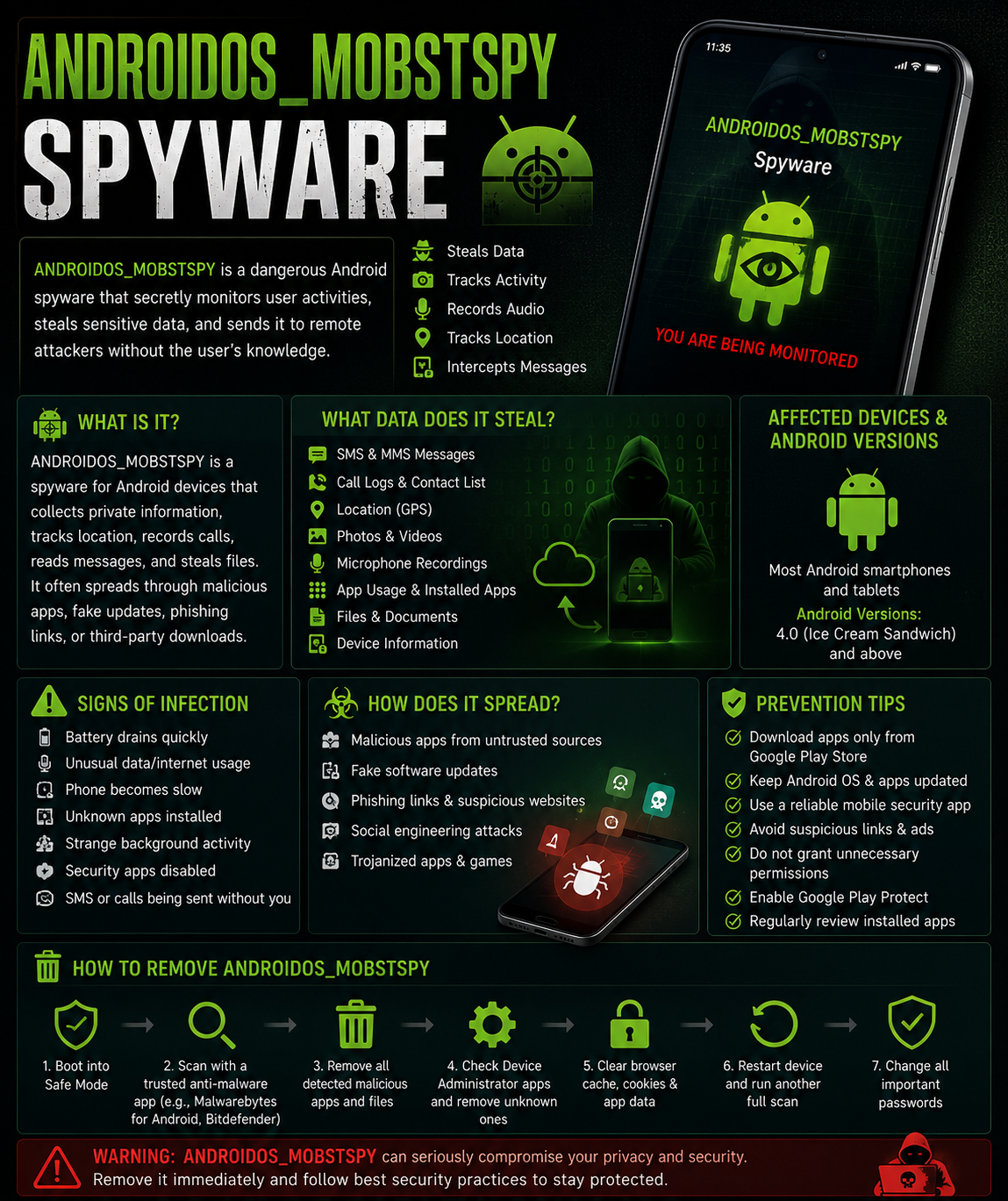
ANDROIDOS_MOBSTSPY Is A Mobile Spyware Threat That Targets Android Devices And Is Designed To Secretly Monitor User Activity, Collect Sensitive Information, And Transmit Stolen Data To Remote Command-and-control (C2) Servers Operated By Cybercriminals. Security Vendors Use The Detection Name "ANDROIDOS_MOBSTSPY" To Identify Spyware Applications That Perform Unauthorized Surveillance On Infected Smartphones And Tablets.
Unlike Ransomware, Which Encrypts Files, Or Banking Trojans That Primarily Target Financial Information, Spyware Focuses On Gathering Personal, Corporate, And Behavioral Data From Victims. Once Installed, ANDROIDOS_MOBSTSPY May Operate Silently In The Background While Monitoring Calls, SMS Messages, Contact Lists, Browsing Activity, Location Data, And Other Sensitive Information.
The Spyware Is Commonly Distributed Through Malicious Android Applications, Fake Software Updates, Third-party App Stores, Phishing Campaigns, Malicious Links, And Trojanized Applications Disguised As Legitimate Software. In Some Cases, Attackers Disguise The Spyware As Productivity Tools, Games, Security Applications, Or Messaging Apps.
After Installation, The Malware Typically Requests Extensive Permissions That Allow Access To Device Resources Such As The Microphone, Camera, Contacts, Storage, SMS Messages, And Location Services. Users Often Grant These Permissions Without Realizing The Security Risks Involved.
The Primary Goal Of ANDROIDOS_MOBSTSPY Is Cyber Espionage, Identity Theft, Credential Harvesting, Financial Fraud, And Unauthorized Surveillance.
A Typical Infection Process Includes:
User Downloads A Malicious Android Application.
Application Requests Excessive Permissions.
Spyware Installs Hidden Background Services.
Malware Connects To A Remote Command Server.
Sensitive Data Is Collected Continuously.
Stolen Information Is Uploaded To Attackers.
Additional Malicious Modules May Be Downloaded.
Some Variants Can Also Evade Detection By Hiding Application Icons Or Masquerading As Legitimate System Processes.
ANDROIDOS_MOBSTSPY Primarily Targets User Data Rather Than System Destruction.
SMS Databases
Contact Databases
Call Logs
Browser History Files
Downloaded Documents
Stored Images
Audio Recordings
Video Files
Application Databases
Authentication Tokens
Personal Data
Full Name
Phone Number
Email Addresses
Contact Lists
Device Identifiers
Communication Data
SMS Messages
MMS Messages
Call History
Instant Messaging Conversations
Location Data
GPS Coordinates
Wi-Fi Location Information
Device Movement History
Media Files
Photos
Videos
Voice Recordings
Financial Information
Banking Credentials
Payment Application Data
Cryptocurrency Wallet Information
Authentication Data
Login Credentials
Saved Passwords
Session Tokens
The Specific Information Stolen Depends On The Permissions Granted And The Spyware Variant Involved.
ANDROIDOS_MOBSTSPY Primarily Targets Android Devices.
Android 4.0 Ice Cream Sandwich
Android 4.1–4.3 Jelly Bean
Android 4.4 KitKat
Android 5.0–5.1 Lollipop
Android 6 Marshmallow
Android 7 Nougat
Android 8 Oreo
Android 9 Pie
Android 10
Android 11
Android 12
Android 13
Android 14 And Later Versions
Older Android Versions Generally Face Higher Risk Because They May No Longer Receive Security Updates.
Smartphones
Tablets
Android-based Enterprise Devices
Android TV Devices (in Some Cases)
ANDROIDOS_MOBSTSPY Does Not Specifically Infect Browsers But May Monitor Browsing Activity And Steal Browser-related Information.
Commonly Affected Browsers Include:
Google Chrome
Mozilla Firefox
Microsoft Edge
Opera
Samsung Internet Browser
Brave Browser
The Spyware May Collect:
Browsing History
Search Activity
Saved Passwords
Session Cookies
Autofill Information
In Some Variants, Browser Overlays May Be Used To Steal Login Credentials.
Users May Observe The Following Indicators:
Device Performance Issues
Slower Device Performance
Excessive Battery Drain
Increased CPU Usage
Device Overheating
Network Activity
Increased Mobile Data Usage
Unusual Internet Connections
Frequent Background Communication
Application Behavior
Unknown Apps Installed
Hidden Applications
Excessive Permission Requests
Unexpected Crashes
Privacy Indicators
Microphone Activation Without Reason
Camera Usage Indicators Appearing Unexpectedly
Unauthorized SMS Messages
Suspicious Notifications
The Following Security Measures Can Help Prevent ANDROIDOS_MOBSTSPY Infections:
Install Applications Exclusively From Official Sources Such As:
Google Play Store
Avoid Third-party App Stores Whenever Possible.
Regularly Install:
Security Patches
Operating System Updates
Application Updates
Carefully Evaluate Permission Requests Before Installation.
Be Cautious If An App Requests:
Camera Access
Microphone Access
SMS Permissions
Contact List Access
without A Legitimate Reason.
Google Play Protect Helps Detect Potentially Harmful Applications.
Use Reputable Mobile Security Solutions To Detect Spyware And Malicious Applications.
Do Not Click On:
Unknown URLs
Phishing Messages
Unexpected Email Attachments
Enable:
Strong Passwords
PIN Protection
Multi-factor Authentication (MFA)
Publicly Available Security Reports Generally Categorize ANDROIDOS_MOBSTSPY Within Broader Android Spyware Campaigns Rather Than Publishing Exact Infection Counts.
As A Result, There Is No Verified Global Figure For:
Total Infected Devices
Exact Number Of Affected Systems
Total Victim Organizations
However, Android Spyware Families With Similar Capabilities Have Been Detected Across Numerous Countries Worldwide.
United States
India
United Kingdom
Germany
France
Canada
Brazil
Mexico
Russia
China
South Korea
Japan
Australia
Indonesia
Philippines
South Africa
Because Android Is The World's Most Widely Used Mobile Operating System, Spyware Campaigns Often Target Users Globally.
The Actual Number Of Infected Devices May Range From Thousands To Hundreds Of Thousands Depending On The Specific Campaign And Distribution Method.
If Your Android Device Is Infected, Follow These Steps:
Disable:
Wi-Fi
Mobile Data
Bluetooth
This Helps Prevent Further Communication With Attacker-controlled Servers.
Navigate To:
Settings → Apps
Look For:
Unknown Applications
Recently Installed Apps
Apps Requesting Excessive Permissions
Review Permissions And Disable Unnecessary Access To:
Camera
Microphone
Contacts
SMS
Storage
Location
Safe Mode Prevents Many Third-party Applications From Running.
Remove Suspicious Applications While In Safe Mode.
Perform A Complete Device Scan Using A Trusted Android Security Solution.
Remove All Detected Threats.
Delete:
Cache
Cookies
Saved Sessions
Stored Passwords
from All Installed Browsers.
Install All Available:
Android Updates
Security Patches
Application Updates
After Cleaning The Device, Change Passwords For:
Email Accounts
Banking Applications
Social Media Accounts
Cloud Storage Services
Use A Clean Device When Changing Passwords.
Review:
Banking Transactions
Payment Applications
Credit Card Activity
for Suspicious Activity.
For Persistent Infections:
Back Up Important Files.
Perform A Factory Reset.
Reinstall Applications Only From Trusted Sources.
A Factory Reset Is Often The Most Effective Method For Removing Deeply Embedded Android Spyware.
ANDROIDOS_MOBSTSPY Is A Dangerous Android Spyware Threat That Secretly Collects Sensitive Information From Infected Devices. It Can Steal Messages, Contacts, Location Data, Credentials, Browsing Information, And Multimedia Files While Operating Unnoticed In The Background. The Spyware Primarily Spreads Through Malicious Applications And Untrusted Downloads. Strong Security Practices, Careful Permission Management, Regular Updates, Mobile Security Software, And Prompt Removal Procedures Are Essential To Protecting Android Devices From ANDROIDOS_MOBSTSPY And Similar Spyware Threats.
Step 1: Boot Into Safe Mode
Restart Your PC And Press F8 (or Shift + F8 For Some Systems) Before Windows Loads.
Choose Safe Mode With Networking.
Safe Mode Prevents Most Malware From Loading.
Press Win + R, Type appwiz.cpl, And Press Enter.
Sort By Install Date And Uninstall Unknown Or Recently Added Programs.
Use A Trusted Anti-malware Tool:
Malwarebytes – https://www.malwarebytes.com
Screenshot Of Malwarebytes - Visit Links
Microsoft Defender – Built Into Windows 10/11
HitmanPro, ESET Online Scanner, Or Kaspersky Virus Removal Tool
ZoneAlarm Pro Antivirus + Firewall NextGen
VIPRE Antivirus - US And Others Countries, | India
Run A Full Scan And Delete/quarantine Detected Threats.
Win + R, Type temp → Delete All Files.Press Win + R, Type %temp% → Delete All Files.
Use Disk Cleanup: cleanmgr In The Run Dialog.
Go To: C:\Windows\System32\drivers\etc
Open hosts File With Notepad.
Replace With Default Content:
Press Ctrl + Shift + Esc → Open Task Manager
Go To Startup Tab
Disable Any Suspicious Entries.
Open Command Prompt As Administrator.
Run These Commands:
netsh Winsock Reset

netsh Int Ip Reset

ipconfig /flushdns
Unwanted Homepage Or Search Engine
Pop-ups Or Redirects
Unknown Extensions Installed
For Chrome:
Go To: chrome://extensions/
Remove Anything Unfamiliar
For Firefox:
Go To: about:addons → Extensions
Remove Suspicious Add-ons
For Edge:
Go To: edge://extensions/
Uninstall Unknown Add-ons
Chrome:
Go To chrome://settings/reset → "Restore Settings To Their Original Defaults"
Firefox:
Go To about:support → "Refresh Firefox"
Edge:
Go To edge://settings/resetProfileSettings → "Reset Settings"
All Browsers:
Use Ctrl + Shift + Del → Select All Time
Clear Cookies, Cached Files, And Site Data
Make Sure They Are Not Hijacked.
Chrome: chrome://settings/search
Firefox: about:preferences#search
Edge: edge://settings/search
Chrome: chrome://settings/cleanup
Use Malwarebytes Browser Guard For Real-time Browser Protection.
Always Download Software From Trusted Sources.
Keep Windows, Browsers, And Antivirus Updated.
Avoid Clicking Suspicious Links Or Ads.
Use ad Blockers And reputable Antivirus Software.
Backup Your Files Regularly.
To Remove Malware From Your Windows PC, Start By Booting Into Safe Mode, Uninstalling Suspicious Programs, And Scanning With Trusted Anti-malware Tools Like Malwarebytes. Clear Temporary Files, Reset Your Network Settings, And Check Startup Apps For Anything Unusual.
For web Browsers, Remove Unwanted Extensions, Reset Browser Settings, Clear Cache And Cookies, And Ensure Your Homepage And Search Engine Haven’t Been Hijacked. Use Cleanup Tools Like Chrome Cleanup Or Browser Guard For Added Protection.
?? Prevention Tips: Keep Software Updated, Avoid Suspicious Downloads, And Use Antivirus Protection Plus Browser Ad Blockers. Regular Backups Are Essential.
Why It Matters: Not All VPNs Offer Malware Protection.
What To Look For: Providers With built-in Malware/ad/tracker Blockers (e.g., NordVPN’s Threat Protection, ProtonVPN’s NetShield).
Purpose: Prevents Data Leaks If Your VPN Connection Drops.
Benefit: Ensures Your Real IP And Browsing Activity Aren’t Exposed To Malware-distributing Websites.
Why It Matters: DNS Leaks Can Expose Your Online Activity To Attackers.
Solution: Enable DNS Leak Protection In Your VPN Settings Or Use A Secure DNS Like Cloudflare (1.1.1.1).
Risk: Free VPNs Often Contain Malware, Sell User Data, Or Lack Security Features.
Better Option: Use Reputable Paid VPNs That Offer security Audits And Transparent Privacy Policies.
Some VPNs Block Known Phishing And Malicious Sites.
Example: Surfshark’s CleanWeb, CyberGhost’s Content Blocker.
Reason: Security Patches Fix Known Vulnerabilities.
Tip: Enable Auto-updates Or Check For Updates Weekly.
Scope: Malware Can Enter Through Phones, Tablets, Or IoT Devices.
Solution: Install VPN Apps On Every Internet-connected Device.
Fact: VPNs Do Not Remove Or Detect Malware On Your System.
Complement It With:
Antivirus Software
Firewall
Browser Extensions For Script Blocking
VPN Encrypts Traffic But Can’t Stop Malware From Executing If You Download Infected Files.
Split Tunneling Allows Certain Apps/sites To Bypass VPN.
Tip: Never Exclude Browsers, Email Clients, Or Download Managers From VPN Tunneling.
A VPN (Virtual Private Network) Enhances Your Online Privacy By Encrypting Your Internet Traffic And Masking Your IP Address. It Protects Your Data On Public Wi-Fi, Hides Browsing Activity From Hackers And ISPs, And Helps Bypass Geo-restrictions. VPNs Also Add A Layer Of Defense Against Malware By Blocking Malicious Websites And Trackers When Using Advanced Features. However, A VPN Does Not Remove Existing Malware Or Act As Antivirus Software. For Full Protection, Combine VPN Use With Antivirus Tools, Regular Software Updates, And Cautious Browsing Habits. Always Choose A Reputable VPN Provider With Strong Security And Privacy Policies.
ANDROIDOS_MOBSTSPY Spyware, How To Fix ANDROIDOS_MOBSTSPY Spyware, Remove ANDROIDOS_MOBSTSPY Spyware, Delete ANDROIDOS_MOBSTSPY Spyware, Uninstall AND