 Blog's Page
 Blog's Page
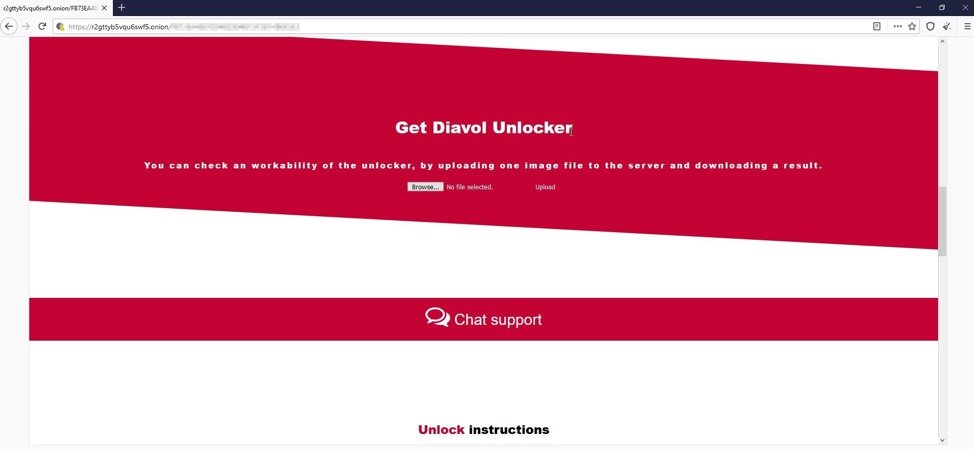
Diavol Ransomware Is A Sophisticated And Highly Destructive Ransomware Family That Emerged In 2021 And Quickly Gained Attention Due To Its Targeted Attacks Against Medium And Large Organizations. Unlike Many Ransomware Operations That Function Under A Ransomware-as-a-Service (RaaS) Model, Diavol Appears To Have Been Operated By A Smaller, More Centralized Cybercriminal Group. It Is Known For Encrypting Valuable Organizational Data, Disrupting Business Operations, And Demanding Ransom Payments In Cryptocurrency In Exchange For Decryption Tools.
Security Researchers Identified Diavol During Investigations Into Attacks Linked To Cybercriminal Groups That Had Previously Deployed Other Ransomware Families. The Ransomware Employs Strong Encryption, Advanced Evasion Techniques, And Extensive Customization To Maximize Damage While Reducing The Likelihood Of Detection. Its Operators Often Gained Unauthorized Access To Victim Networks Through Stolen Credentials, Exploited Vulnerabilities, Or Compromised Remote Access Services Before Manually Deploying The Ransomware.
Although Diavol Has Not Been As Widespread As Ransomware Families Such As LockBit Or Conti, It Remains A Significant Example Of Modern Ransomware That Combines Technical Sophistication With Carefully Planned Intrusion Techniques.
Diavol Ransomware Was First Observed In June 2021 By Cybersecurity Researchers. It Gained Prominence After Being Used In Targeted Attacks Against Organizations In Sectors Such As Healthcare, Manufacturing, Finance, And Technology.
Researchers Noted Similarities Between Diavol And Other Ransomware Campaigns, Particularly In The Methods Used To Gain Initial Access And Move Laterally Within Compromised Networks. However, Diavol Distinguished Itself Through Its Unique Encryption Routines, Customized Attack Methods, And The Absence Of A Broad Affiliate-based RaaS Structure.
Unlike Mass-distributed Ransomware, Diavol Attacks Were Generally Conducted Manually. Attackers Carefully Selected Victims, Performed Reconnaissance, Escalated Privileges, Disabled Security Mechanisms, And Only Then Launched The Encryption Stage.
The Primary Objectives Of Diavol Ransomware Include:
Encrypting Critical Organizational Files
Interrupting Normal Business Operations
Extorting Victims For Ransom Payments
Causing Financial Losses
Pressuring Organizations Through Operational Disruption
Targeting High-value Enterprise Environments
Unlike Some Ransomware Groups That Rely Heavily On Public Data Leaks, Diavol Primarily Focused On Encryption And Business Disruption, Although Attackers Could Still Steal Sensitive Information During An Intrusion.
A Typical Diavol Ransomware Attack Progresses Through Several Stages.
Attackers First Gain Unauthorized Access To The Victim's Network Using Techniques Such As:
Phishing Emails
Compromised Remote Desktop Protocol (RDP)
VPN Vulnerabilities
Exploitation Of Unpatched Software
Stolen Administrator Credentials
Credential Stuffing Attacks
Once Access Is Established, Attackers Attempt To Remain Undetected While Exploring The Environment.
The Attackers Gather Information About The Victim's Network.
They Identify:
Domain Controllers
File Servers
Database Servers
Backup Systems
Security Software
User Accounts
Shared Folders
Critical Business Applications
This Information Helps Attackers Determine Which Systems Will Cause The Greatest Operational Impact If Encrypted.
Attackers Seek Higher Privileges By:
Dumping Stored Credentials
Exploiting Privilege Escalation Vulnerabilities
Abusing Administrative Tools
Stealing Domain Administrator Credentials
Administrative Access Enables Full Control Over Enterprise Resources.
After Obtaining Elevated Privileges, Attackers Spread Throughout The Network Using Legitimate Administrative Tools And Remote Management Protocols, Including:
Windows Management Instrumentation (WMI)
PowerShell
PsExec
Remote Desktop Protocol
SMB (Server Message Block)
This Allows Multiple Systems To Be Compromised Before Encryption Begins.
Before Encrypting Files, Diavol Attempts To Weaken Defenses By:
Disabling Antivirus Software
Stopping Backup Services
Terminating Database Processes
Removing Security Logs Where Possible
Disabling Recovery Mechanisms
These Actions Reduce The Chances Of Detection And Make Recovery More Difficult.
Once Preparation Is Complete, Diavol Encrypts Files On Local Drives And Accessible Network Shares.
Common Targets Include:
Office Documents
Databases
Images
Videos
Archives
Virtual Machine Files
Source Code
Financial Records
System Files Necessary For Windows Operation Are Generally Excluded To Ensure The Victim Can Still Read The Ransom Instructions.
After Encryption, Diavol Leaves A Ransom Note That Typically Contains:
Notification That Files Have Been Encrypted
Instructions For Contacting The Attackers
Cryptocurrency Payment Details
Deadline For Payment
Warnings Regarding Delayed Payment
Victims Are Instructed To Communicate Through Anonymous Channels Such As Tor-based Websites Or Encrypted Messaging Services.
Diavol Ransomware Includes Several Advanced Capabilities.
Diavol Uses Modern Cryptographic Techniques To Prevent Unauthorized Recovery Of Encrypted Files. Strong Encryption Ensures That Restoring Files Without The Correct Decryption Key Is Computationally Infeasible.
The Ransomware Encrypts Multiple Files Simultaneously By Using Multi-threading.
Benefits Include:
Faster Execution
Reduced Detection Window
Greater Impact Before Defenders Can Respond
Instead Of Encrypting Every File, Diavol Can Prioritize Valuable Data.
Examples Include:
Database Files
Financial Documents
Virtual Machine Images
Shared Network Folders
This Balances Speed With Operational Disruption.
To Ensure Successful Encryption, Diavol Attempts To Stop Processes That May Lock Files.
Examples Include:
Database Servers
Backup Software
Email Servers
Productivity Applications
Terminating These Processes Allows More Files To Be Encrypted Successfully.
The Ransomware May Stop Windows Services Related To:
Backup
Security
Database Management
Virtualization
This Increases The Attack's Effectiveness.
Diavol Follows A Structured Encryption Process:
Enumerates Available Drives.
Identifies Target Files.
Excludes Essential Operating System Files.
Generates Encryption Keys.
Encrypts Selected Files.
Renames Encrypted Files (extension May Vary By Campaign).
Creates Ransom Notes In Affected Directories.
The Encryption Is Designed To Maximize Business Disruption While Preserving Enough System Functionality For Victims To Receive Ransom Instructions.
Common Methods Used To Deploy Diavol Include:
Employees Receive Malicious Emails Containing Infected Attachments Or Links.
Weak Or Stolen RDP Credentials Enable Attackers To Access Internal Systems Remotely.
Vulnerabilities In VPN Appliances Can Provide An Entry Point Into Corporate Networks.
Attackers Exploit Unpatched Applications Or Operating Systems To Gain Access.
Usernames And Passwords Obtained Through Malware, Phishing, Or Underground Marketplaces Are Commonly Used To Infiltrate Networks.
Diavol Primarily Targeted Organizations Rather Than Individual Users.
Frequently Targeted Sectors Include:
Healthcare
Financial Services
Manufacturing
Education
Government
Technology
Retail
Professional Services
Organizations With Valuable Data And Limited Downtime Tolerance Were Particularly Attractive Targets.
A Successful Diavol Attack Can Have Severe Consequences.
Victims May Incur:
Ransom Demands
Incident Response Expenses
Legal Fees
Recovery Costs
Business Interruption Losses
Encrypted Systems Can Interrupt:
Manufacturing Processes
Customer Services
Financial Operations
Supply Chain Activities
Administrative Functions
Recovery Often Requires Days Or Weeks.
If Backups Are Unavailable Or Compromised, Organizations May Permanently Lose Important Information.
Public Disclosure Of An Attack Can Reduce Customer Confidence And Affect Future Business Relationships.
Organizations Handling Personal Or Sensitive Information May Face Regulatory Investigations, Mandatory Breach Notifications, And Financial Penalties Depending On Applicable Laws.
Security Teams Can Detect Diavol Activity By Monitoring For:
Unusual Administrative Logins
Unexpected PowerShell Execution
Large-scale File Modifications
Rapid File Encryption Activity
Service Termination Events
Credential Dumping Attempts
Suspicious Network Scanning
Lateral Movement Between Systems
Creation Of Ransom Notes
Modern Endpoint Detection And Response (EDR) Solutions And Security Information And Event Management (SIEM) Platforms Can Help Identify These Indicators At An Early Stage.
Organizations Can Significantly Reduce The Risk Of Diavol Attacks By Implementing Layered Security Controls.
Promptly Install Security Updates For:
Operating Systems
VPN Appliances
Firewalls
Servers
Applications
Enable MFA For:
Remote Desktop
VPN Access
Administrative Accounts
Cloud Services
Email Accounts
Maintain:
Offline Backups
Immutable Backups
Frequent Backup Testing
Multiple Backup Copies
Reliable Backups Improve Recovery Without Relying On Attackers.
Deploy:
Spam Filtering
Attachment Scanning
URL Filtering
Phishing Protection
Regular Employee Awareness Training Reduces The Likelihood Of Successful Phishing Attacks.
Use Modern Security Solutions That Provide:
Antivirus
Behavioral Detection
EDR Capabilities
Application Control
Real-time Monitoring
Separate Critical Systems From General User Networks.
Restrict Unnecessary Communication Between Network Segments To Limit Ransomware Spread.
Users Should Receive Only The Permissions Necessary For Their Work.
Administrative Accounts Should Be Limited And Closely Monitored.
Monitor For:
Failed Login Attempts
Privilege Escalation
Lateral Movement
Unusual Network Traffic
Security Policy Changes
Continuous Monitoring Helps Identify Attacks Before Ransomware Deployment.
If Diavol Ransomware Is Detected, Organizations Should Act Quickly.
Recommended Steps Include:
Isolate Infected Systems From The Network.
Disable Compromised User Accounts.
Preserve Logs And Forensic Evidence.
Identify The Initial Entry Point.
Remove Malicious Tools And Persistence Mechanisms.
Restore Systems From Verified Clean Backups.
Reset Passwords And Administrative Credentials.
Patch Exploited Vulnerabilities.
Notify Affected Stakeholders Where Required.
Conduct A Post-incident Review To Improve Defenses.
Organizations Should Generally Avoid Paying The Ransom Because Payment Does Not Guarantee Successful Decryption Or That Attackers Will Not Retain Or Misuse Stolen Information. Reporting The Incident To Appropriate Cybersecurity Authorities Or Law Enforcement Is Also Recommended.
Diavol Is Difficult To Defend Against Because It Relies Heavily On Manual Attack Techniques Rather Than Fully Automated Malware. Skilled Attackers Often Spend Days Or Weeks Inside A Victim's Network Performing Reconnaissance, Stealing Credentials, Escalating Privileges, And Identifying Critical Assets Before Deploying The Ransomware. They Frequently Use Legitimate Administrative Tools, Making Malicious Activity Appear Similar To Normal System Administration. This "living Off The Land" Approach Reduces The Effectiveness Of Traditional Signature-based Antivirus Solutions.
Additionally, Attackers Often Disable Backups, Terminate Important Services, And Encrypt Multiple Systems Simultaneously, Leaving Organizations With Little Time To React. These Tactics Highlight The Importance Of Continuous Monitoring, Behavioral Detection, Network Segmentation, And Well-rehearsed Incident Response Procedures.
Diavol Ransomware Is A Highly Targeted And Technically Advanced Ransomware Family That Emerged In 2021 And Focused Primarily On Disrupting Enterprise Environments. Rather Than Relying On Mass Infections, Its Operators Carefully Selected Victims, Gained Persistent Access, Escalated Privileges, Moved Laterally Across Networks, And Then Encrypted Critical Systems To Maximize Operational Impact. Features Such As Multi-threaded Encryption, Process Termination, Service Manipulation, And The Use Of Legitimate Administrative Tools Made Diavol A Formidable Threat.
Although Diavol Has Been Less Widespread Than Some Other Ransomware Families, It Demonstrates How Modern Ransomware Attacks Combine Technical Sophistication With Careful Planning. Organizations Can Reduce Their Risk By Adopting A Layered Cybersecurity Strategy That Includes Timely Patching, Multi-factor Authentication, Employee Awareness Training, Endpoint Detection And Response, Network Segmentation, Secure Offline Backups, And Comprehensive Incident Response Planning. Together, These Measures Strengthen Resilience Against Ransomware And Help Organizations Recover More Effectively If An Attack Occurs.
Step 1: Boot Into Safe Mode
Restart Your PC And Press F8 (or Shift + F8 For Some Systems) Before Windows Loads.
Choose Safe Mode With Networking.
Safe Mode Prevents Most Malware From Loading.
Press Win + R, Type appwiz.cpl, And Press Enter.
Sort By Install Date And Uninstall Unknown Or Recently Added Programs.
Use A Trusted Anti-malware Tool:
Malwarebytes – https://www.malwarebytes.com
Screenshot Of Malwarebytes - Visit Links
Microsoft Defender – Built Into Windows 10/11
HitmanPro, ESET Online Scanner, Or Kaspersky Virus Removal Tool
ZoneAlarm Pro Antivirus + Firewall NextGen
VIPRE Antivirus - US And Others Countries, | India
Run A Full Scan And Delete/quarantine Detected Threats.
Win + R, Type temp → Delete All Files.Press Win + R, Type %temp% → Delete All Files.
Use Disk Cleanup: cleanmgr In The Run Dialog.
Go To: C:\Windows\System32\drivers\etc
Open hosts File With Notepad.
Replace With Default Content:
Press Ctrl + Shift + Esc → Open Task Manager
Go To Startup Tab
Disable Any Suspicious Entries.
Open Command Prompt As Administrator.
Run These Commands:
netsh Winsock Reset

netsh Int Ip Reset

ipconfig /flushdns
Unwanted Homepage Or Search Engine
Pop-ups Or Redirects
Unknown Extensions Installed
For Chrome:
Go To: chrome://extensions/
Remove Anything Unfamiliar
For Firefox:
Go To: about:addons → Extensions
Remove Suspicious Add-ons
For Edge:
Go To: edge://extensions/
Uninstall Unknown Add-ons
Chrome:
Go To chrome://settings/reset → "Restore Settings To Their Original Defaults"
Firefox:
Go To about:support → "Refresh Firefox"
Edge:
Go To edge://settings/resetProfileSettings → "Reset Settings"
All Browsers:
Use Ctrl + Shift + Del → Select All Time
Clear Cookies, Cached Files, And Site Data
Make Sure They Are Not Hijacked.
Chrome: chrome://settings/search
Firefox: about:preferences#search
Edge: edge://settings/search
Chrome: chrome://settings/cleanup
Use Malwarebytes Browser Guard For Real-time Browser Protection.
Always Download Software From Trusted Sources.
Keep Windows, Browsers, And Antivirus Updated.
Avoid Clicking Suspicious Links Or Ads.
Use ad Blockers And reputable Antivirus Software.
Backup Your Files Regularly.
To Remove Malware From Your Windows PC, Start By Booting Into Safe Mode, Uninstalling Suspicious Programs, And Scanning With Trusted Anti-malware Tools Like Malwarebytes. Clear Temporary Files, Reset Your Network Settings, And Check Startup Apps For Anything Unusual.
For web Browsers, Remove Unwanted Extensions, Reset Browser Settings, Clear Cache And Cookies, And Ensure Your Homepage And Search Engine Haven’t Been Hijacked. Use Cleanup Tools Like Chrome Cleanup Or Browser Guard For Added Protection.
?? Prevention Tips: Keep Software Updated, Avoid Suspicious Downloads, And Use Antivirus Protection Plus Browser Ad Blockers. Regular Backups Are Essential.
Why It Matters: Not All VPNs Offer Malware Protection.
What To Look For: Providers With built-in Malware/ad/tracker Blockers (e.g., NordVPN’s Threat Protection, ProtonVPN’s NetShield).
Purpose: Prevents Data Leaks If Your VPN Connection Drops.
Benefit: Ensures Your Real IP And Browsing Activity Aren’t Exposed To Malware-distributing Websites.
Why It Matters: DNS Leaks Can Expose Your Online Activity To Attackers.
Solution: Enable DNS Leak Protection In Your VPN Settings Or Use A Secure DNS Like Cloudflare (1.1.1.1).
Risk: Free VPNs Often Contain Malware, Sell User Data, Or Lack Security Features.
Better Option: Use Reputable Paid VPNs That Offer security Audits And Transparent Privacy Policies.
Some VPNs Block Known Phishing And Malicious Sites.
Example: Surfshark’s CleanWeb, CyberGhost’s Content Blocker.
Reason: Security Patches Fix Known Vulnerabilities.
Tip: Enable Auto-updates Or Check For Updates Weekly.
Scope: Malware Can Enter Through Phones, Tablets, Or IoT Devices.
Solution: Install VPN Apps On Every Internet-connected Device.
Fact: VPNs Do Not Remove Or Detect Malware On Your System.
Complement It With:
Antivirus Software
Firewall
Browser Extensions For Script Blocking
VPN Encrypts Traffic But Can’t Stop Malware From Executing If You Download Infected Files.
Split Tunneling Allows Certain Apps/sites To Bypass VPN.
Tip: Never Exclude Browsers, Email Clients, Or Download Managers From VPN Tunneling.
A VPN (Virtual Private Network) Enhances Your Online Privacy By Encrypting Your Internet Traffic And Masking Your IP Address. It Protects Your Data On Public Wi-Fi, Hides Browsing Activity From Hackers And ISPs, And Helps Bypass Geo-restrictions. VPNs Also Add A Layer Of Defense Against Malware By Blocking Malicious Websites And Trackers When Using Advanced Features. However, A VPN Does Not Remove Existing Malware Or Act As Antivirus Software. For Full Protection, Combine VPN Use With Antivirus Tools, Regular Software Updates, And Cautious Browsing Habits. Always Choose A Reputable VPN Provider With Strong Security And Privacy Policies.
Diavol Ransomware, Remove Diavol Ransomware, Uninstall Diavol Ransomware, Delete Diavol Ransomware, Get Rid Of Diavol Ransomware, Diavol Ransomware Re