 Blog's Page
 Blog's Page
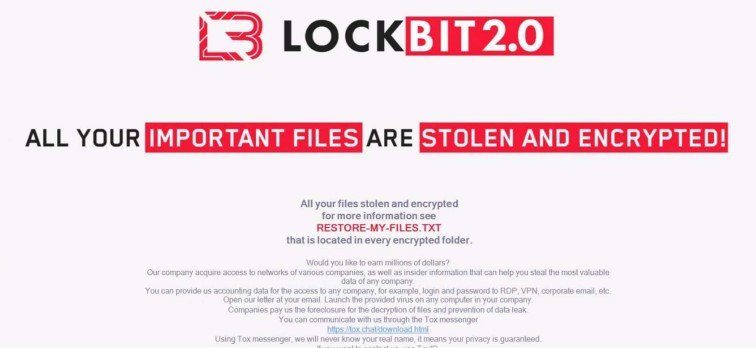
LockBit 2.0 Is One Of The Most Sophisticated And Dangerous Ransomware Variants That Has Targeted Organizations Worldwide. It Is An Upgraded Version Of The Original LockBit Ransomware, Introduced In 2021 By A Cybercriminal Group Operating Under The Ransomware-as-a-Service (RaaS) Model. LockBit 2.0 Is Designed To Encrypt Files On Infected Systems, Making Them Inaccessible To Users, While Demanding A Ransom Payment In Exchange For A Decryption Key. Besides Encryption, It Also Steals Sensitive Information And Threatens To Publish It If The Victim Refuses To Pay. This Technique Is Known As double Extortion.
The Ransomware Has Affected Businesses, Healthcare Institutions, Educational Organizations, Government Agencies, And Critical Infrastructure Across Multiple Countries. Due To Its Speed, Automation, And Advanced Evasion Techniques, LockBit 2.0 Has Become One Of The Most Successful Ransomware Families In Cybercrime History.
The Original LockBit Ransomware First Appeared In 2019. It Quickly Gained Popularity Because Of Its Ability To Spread Automatically Across Networks And Encrypt Files Much Faster Than Many Competing Ransomware Families.
In June 2021, The Operators Released LockBit 2.0, Introducing Several Significant Improvements:
Faster Encryption Process
Better Methods For Disabling Security Software
Automated Network Propagation
Data Theft Before Encryption
Improved Affiliate Management System
More Advanced Encryption Algorithms
The Developers Marketed LockBit 2.0 On Underground Cybercrime Forums, Recruiting Affiliates Who Could Use The Ransomware To Attack Organizations. In Exchange, Affiliates Shared A Percentage Of Ransom Payments With The Ransomware Developers.
LockBit 2.0 Operates Using The Ransomware-as-a-Service (RaaS) Business Model.
In This Model:
Developers Create And Maintain The Ransomware.
Affiliates Conduct Attacks.
Developers Receive A Percentage Of Ransom Payments.
Affiliates Keep The Remaining Profits.
This Model Allows Attackers With Limited Technical Knowledge To Launch Sophisticated Ransomware Attacks.
The RaaS Model Has Made Ransomware Attacks More Frequent And More Damaging Because It Lowers The Barrier To Entry For Cybercriminals.
The LockBit 2.0 Attack Typically Follows Several Stages.
Attackers First Gain Entry Into The Victim's Network Using Methods Such As:
Phishing Emails
Stolen Credentials
Remote Desktop Protocol (RDP) Attacks
VPN Vulnerabilities
Exploiting Unpatched Software
Third-party Software Vulnerabilities
Once Inside, Attackers Establish Persistence To Maintain Access.
The Attackers Attempt To Gain Administrative Privileges.
They May Exploit:
Windows Vulnerabilities
Weak Passwords
Misconfigured Active Directory
Credential Dumping Tools
Local Privilege Escalation Exploits
Administrator Access Allows Them To Control Multiple Systems Across The Network.
Before Launching Encryption, LockBit 2.0 Performs Reconnaissance.
It Identifies:
Shared Folders
File Servers
Backup Systems
Domain Controllers
Database Servers
Security Software
This Helps Attackers Maximize The Impact Of The Attack.
The Ransomware Spreads To Additional Systems Using:
SMB (Server Message Block)
PowerShell
PsExec
Windows Management Instrumentation (WMI)
Remote Desktop Protocol
This Enables Simultaneous Encryption Across Many Devices.
One Major Feature Introduced In LockBit 2.0 Is Data Theft.
Before Encryption, Attackers Steal:
Financial Records
Customer Databases
Employee Information
Contracts
Intellectual Property
Medical Records
The Stolen Data Is Later Used For Blackmail.
After Data Theft, LockBit 2.0 Encrypts Files Using Strong Cryptographic Algorithms.
Common File Types Targeted Include:
Documents
Images
Databases
Virtual Machines
Source Code
Archives
Backup Files
Encrypted Files Become Inaccessible Without The Private Decryption Key.
After Encryption, Victims Receive A Ransom Note Containing:
Payment Instructions
Deadline
Cryptocurrency Wallet Address
Contact Information
Threats To Leak Stolen Data
The Ransom Is Usually Demanded In Bitcoin Or Another Cryptocurrency.
LockBit 2.0 Includes Several Advanced Technical Capabilities.
LockBit 2.0 Encrypts Files Much Faster Than Many Earlier Ransomware Families.
It Uses:
Multi-threading
Partial File Encryption
Optimized Encryption Routines
This Reduces The Time Available For Defenders To Detect And Stop The Attack.
One Of The Defining Features Is Double Extortion.
The Attackers:
Steal Sensitive Information.
Encrypt Files.
Threaten To Publish Stolen Data If The Ransom Is Not Paid.
This Creates Additional Pressure On Victims.
Unlike Some Ransomware That Requires Manual Deployment, LockBit 2.0 Can Automatically Spread Across Windows Networks.
It Scans:
Network Shares
Connected Systems
Active Directory Environments
This Increases The Number Of Infected Devices.
LockBit 2.0 Supports Execution Through Command-line Arguments.
Attackers Can Customize:
Encryption Speed
Target Directories
Excluded Files
Safe Mode Execution
Network Behavior
A Notable Feature Allows LockBit 2.0 To Reboot Infected Systems Into Windows Safe Mode.
Since Many Security Products Are Disabled In Safe Mode, The Ransomware Can Encrypt Files More Easily.
The Ransomware Attempts To Disable:
Antivirus Software
Endpoint Detection And Response (EDR)
Windows Defender
Backup Services
Security Monitoring Tools
This Improves Its Chances Of Completing Encryption.
LockBit 2.0 Uses Modern Cryptographic Methods.
These Include:
AES (Advanced Encryption Standard)
RSA Public-key Encryption
AES Encrypts Victim Files Efficiently, While RSA Protects The Encryption Keys.
Without The Attackers' Private RSA Key, Decrypting The Files Is Extremely Difficult.
LockBit 2.0 Attacks Organizations Of All Sizes.
Common Targets Include:
Government Agencies
Hospitals
Universities
Manufacturing Companies
Financial Institutions
Retail Businesses
Transportation Companies
Energy Providers
Technology Companies
The Attackers Usually Focus On Organizations Likely To Pay Large Ransoms.
Common Infection Vectors Include:
Victims Receive Malicious Email Attachments Or Links.
Weak RDP Passwords Allow Attackers To Log In Remotely.
Unpatched VPN Devices Can Provide Unauthorized Access.
Attackers Exploit Known Vulnerabilities In Outdated Software.
Credentials Purchased From Cybercrime Markets Are Often Used.
The Consequences Of Infection Can Be Severe.
Organizations May Face:
Ransom Payments
Recovery Expenses
Legal Costs
Lost Revenue
Large Attacks Have Resulted In Losses Of Millions Of Dollars.
Encrypted Systems May Halt:
Manufacturing
Healthcare Services
Banking Operations
Educational Activities
Recovery Can Take Days Or Weeks.
Stolen Confidential Information Can Result In:
Identity Theft
Privacy Violations
Regulatory Penalties
Loss Of Customer Trust
Public Disclosure Of An Attack May Reduce Customer Confidence And Harm An Organization's Reputation.
Security Teams Can Detect LockBit 2.0 Through:
Unusual PowerShell Activity
Large-scale File Modifications
Unexpected Encryption Processes
Suspicious SMB Traffic
Creation Of Ransom Notes
Credential Dumping Attempts
Network Scanning Behavior
Endpoint Detection And Response (EDR) Tools Can Help Identify These Indicators.
Organizations Can Reduce The Risk Of LockBit 2.0 Attacks Through Multiple Layers Of Defense.
Maintain Offline And Immutable Backups.
Regularly Test Backup Restoration Procedures.
Install Security Updates Promptly For:
Operating Systems
VPN Appliances
Firewalls
Applications
Enable MFA For:
VPN Access
Email Accounts
Administrative Accounts
Remote Desktop
Use:
Long Passwords
Password Managers
Account Lockout Policies
Avoid Password Reuse.
Deploy:
Spam Filters
Attachment Scanning
URL Filtering
Train Employees To Recognize Phishing Attempts.
Use:
Antivirus Software
EDR Solutions
Behavioral Monitoring
Application Whitelisting
Separate Critical Systems From User Networks.
Restrict Unnecessary Communication Between Segments.
Users Should Have Only The Permissions Necessary For Their Roles.
Administrative Privileges Should Be Limited.
If LockBit 2.0 Is Detected:
Disconnect Infected Systems From The Network.
Preserve Logs And Evidence.
Notify The Incident Response Team.
Identify The Infection Source.
Restore Systems From Clean Backups.
Reset Compromised Credentials.
Patch Exploited Vulnerabilities.
Monitor For Reinfection.
Notify Affected Stakeholders If Required By Applicable Laws And Regulations.
Review And Improve Security Controls.
Organizations Should Generally Avoid Paying The Ransom, As Payment Does Not Guarantee File Recovery Or Deletion Of Stolen Data And May Encourage Further Criminal Activity.
Some Distinguishing Characteristics Of LockBit 2.0 Include:
Extremely Fast Encryption
Double Extortion Strategy
Ransomware-as-a-Service Model
Automated Network Propagation
Advanced Encryption Algorithms
Safe Mode Execution Capability
Data Theft Before Encryption
Sophisticated Affiliate Program
Ability To Disable Security Software
High Level Of Customization
These Features Have Made LockBit 2.0 One Of The Most Effective Ransomware Families.
Defending Against LockBit 2.0 Is Challenging Because Attackers Continuously Adapt Their Tactics To Bypass Security Measures. They Frequently Exploit Newly Discovered Software Vulnerabilities, Use Legitimate Administrative Tools To Blend With Normal System Activity, And Rely On Stolen Credentials To Avoid Detection. Large Organizations With Complex Networks Are Particularly Vulnerable Because A Single Compromised Account Can Provide Access To Many Interconnected Systems. In Addition, The Use Of Double Extortion Means That Even Organizations With Reliable Backups May Still Face Pressure Due To The Risk Of Sensitive Data Being Leaked Publicly.
To Address These Challenges, Organizations Should Adopt A Layered Cybersecurity Strategy That Combines Preventive Controls, Continuous Monitoring, Regular Employee Awareness Training, Timely Patch Management, And A Well-tested Incident Response Plan. Collaboration With Cybersecurity Experts And Law Enforcement Agencies Can Also Improve The Effectiveness Of Detection, Containment, And Recovery Efforts.
LockBit 2.0 Represents A Significant Evolution In Ransomware, Combining Rapid File Encryption, Automated Propagation, Data Theft, And The Ransomware-as-a-Service Model Into A Highly Effective Cybercriminal Operation. Its Use Of Double Extortion, Strong Encryption Methods, And Techniques For Disabling Security Tools Has Enabled It To Cause Widespread Disruption Across Industries Worldwide. Organizations Face Substantial Financial, Operational, And Reputational Risks From Such Attacks.
The Most Effective Defense Against LockBit 2.0 Is A Proactive, Layered Cybersecurity Approach That Includes Timely Patching, Strong Authentication, Employee Awareness, Network Segmentation, Endpoint Monitoring, And Secure Offline Backups. Equally Important Are Regular Incident Response Exercises And Recovery Planning, Which Help Organizations Respond Quickly And Minimize Damage If An Attack Occurs. By Combining Preventive, Detective, And Recovery Measures, Organizations Can Significantly Reduce The Likelihood And Impact Of Ransomware Incidents.
Step 1: Boot Into Safe Mode
Restart Your PC And Press F8 (or Shift + F8 For Some Systems) Before Windows Loads.
Choose Safe Mode With Networking.
Safe Mode Prevents Most Malware From Loading.
Press Win + R, Type appwiz.cpl, And Press Enter.
Sort By Install Date And Uninstall Unknown Or Recently Added Programs.
Use A Trusted Anti-malware Tool:
Malwarebytes – https://www.malwarebytes.com
Screenshot Of Malwarebytes - Visit Links
Microsoft Defender – Built Into Windows 10/11
HitmanPro, ESET Online Scanner, Or Kaspersky Virus Removal Tool
ZoneAlarm Pro Antivirus + Firewall NextGen
VIPRE Antivirus - US And Others Countries, | India
Run A Full Scan And Delete/quarantine Detected Threats.
Win + R, Type temp → Delete All Files.Press Win + R, Type %temp% → Delete All Files.
Use Disk Cleanup: cleanmgr In The Run Dialog.
Go To: C:\Windows\System32\drivers\etc
Open hosts File With Notepad.
Replace With Default Content:
Press Ctrl + Shift + Esc → Open Task Manager
Go To Startup Tab
Disable Any Suspicious Entries.
Open Command Prompt As Administrator.
Run These Commands:
netsh Winsock Reset

netsh Int Ip Reset

ipconfig /flushdns
Unwanted Homepage Or Search Engine
Pop-ups Or Redirects
Unknown Extensions Installed
For Chrome:
Go To: chrome://extensions/
Remove Anything Unfamiliar
For Firefox:
Go To: about:addons → Extensions
Remove Suspicious Add-ons
For Edge:
Go To: edge://extensions/
Uninstall Unknown Add-ons
Chrome:
Go To chrome://settings/reset → "Restore Settings To Their Original Defaults"
Firefox:
Go To about:support → "Refresh Firefox"
Edge:
Go To edge://settings/resetProfileSettings → "Reset Settings"
All Browsers:
Use Ctrl + Shift + Del → Select All Time
Clear Cookies, Cached Files, And Site Data
Make Sure They Are Not Hijacked.
Chrome: chrome://settings/search
Firefox: about:preferences#search
Edge: edge://settings/search
Chrome: chrome://settings/cleanup
Use Malwarebytes Browser Guard For Real-time Browser Protection.
Always Download Software From Trusted Sources.
Keep Windows, Browsers, And Antivirus Updated.
Avoid Clicking Suspicious Links Or Ads.
Use ad Blockers And reputable Antivirus Software.
Backup Your Files Regularly.
To Remove Malware From Your Windows PC, Start By Booting Into Safe Mode, Uninstalling Suspicious Programs, And Scanning With Trusted Anti-malware Tools Like Malwarebytes. Clear Temporary Files, Reset Your Network Settings, And Check Startup Apps For Anything Unusual.
For web Browsers, Remove Unwanted Extensions, Reset Browser Settings, Clear Cache And Cookies, And Ensure Your Homepage And Search Engine Haven’t Been Hijacked. Use Cleanup Tools Like Chrome Cleanup Or Browser Guard For Added Protection.
?? Prevention Tips: Keep Software Updated, Avoid Suspicious Downloads, And Use Antivirus Protection Plus Browser Ad Blockers. Regular Backups Are Essential.
Why It Matters: Not All VPNs Offer Malware Protection.
What To Look For: Providers With built-in Malware/ad/tracker Blockers (e.g., NordVPN’s Threat Protection, ProtonVPN’s NetShield).
Purpose: Prevents Data Leaks If Your VPN Connection Drops.
Benefit: Ensures Your Real IP And Browsing Activity Aren’t Exposed To Malware-distributing Websites.
Why It Matters: DNS Leaks Can Expose Your Online Activity To Attackers.
Solution: Enable DNS Leak Protection In Your VPN Settings Or Use A Secure DNS Like Cloudflare (1.1.1.1).
Risk: Free VPNs Often Contain Malware, Sell User Data, Or Lack Security Features.
Better Option: Use Reputable Paid VPNs That Offer security Audits And Transparent Privacy Policies.
Some VPNs Block Known Phishing And Malicious Sites.
Example: Surfshark’s CleanWeb, CyberGhost’s Content Blocker.
Reason: Security Patches Fix Known Vulnerabilities.
Tip: Enable Auto-updates Or Check For Updates Weekly.
Scope: Malware Can Enter Through Phones, Tablets, Or IoT Devices.
Solution: Install VPN Apps On Every Internet-connected Device.
Fact: VPNs Do Not Remove Or Detect Malware On Your System.
Complement It With:
Antivirus Software
Firewall
Browser Extensions For Script Blocking
VPN Encrypts Traffic But Can’t Stop Malware From Executing If You Download Infected Files.
Split Tunneling Allows Certain Apps/sites To Bypass VPN.
Tip: Never Exclude Browsers, Email Clients, Or Download Managers From VPN Tunneling.
A VPN (Virtual Private Network) Enhances Your Online Privacy By Encrypting Your Internet Traffic And Masking Your IP Address. It Protects Your Data On Public Wi-Fi, Hides Browsing Activity From Hackers And ISPs, And Helps Bypass Geo-restrictions. VPNs Also Add A Layer Of Defense Against Malware By Blocking Malicious Websites And Trackers When Using Advanced Features. However, A VPN Does Not Remove Existing Malware Or Act As Antivirus Software. For Full Protection, Combine VPN Use With Antivirus Tools, Regular Software Updates, And Cautious Browsing Habits. Always Choose A Reputable VPN Provider With Strong Security And Privacy Policies.
LockBit 2.0 Ransomware, LockBit 2.0 Ransomware Removal, Remove LockBit 2.0 Ransomware, Uninstall LockBit 2.0 Ransomware, Delete LockBit 2.0 Ransomware