 Blog's Page
 Blog's Page
RansomHub Ransomware Including behavior, Infection Methods, Indicators Of Compromise (IOCs), Known Malware Hashes, And known IP Addresses Associated With It. This Is Crucial Information For Threat Analysts, Incident Responders, And Defenders. All Information Below Is Drawn From Reputable Threat Intelligence And Public Advisories.
RansomHub Is A ransomware-as-a-service (RaaS) Strain First Observed In early 2024. It Has Rapidly Become One Of The Most Significant Ransomware Families Due To Its Adoption By Multiple Affiliates — Including Experienced Actors From Variants Like LockBit And ALPHV — And Its Use Of double-extortion Tactics. That Means Victims’ Data Is Both encrypted And exfiltrated Prior To Encryption, With Attackers Threatening To Publish Stolen Data If Ransom Demands Aren’t Met.

RansomHub Was Previously Known Under Other Monikers Such As Cyclops And Knight, Reflecting Its Evolutionary Lineage. Affiliates Deploy Customized Infection Chains Tailored Per Breach, Often Using Sophisticated Methods To Evade Detection And Maximize Compromise.
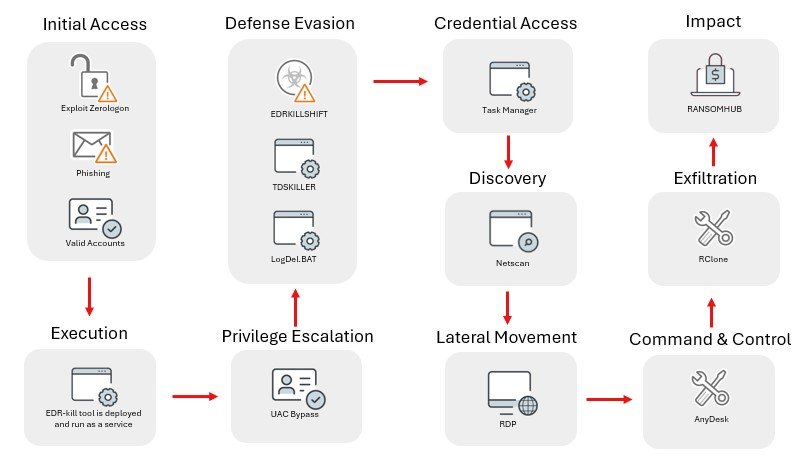
RansomHub Affiliates Gain Initial Access Through Multiple Methods:
Phishing Campaigns — Malicious Emails With Links Or Attachments.
Exploitation Of Public Vulnerabilities — Including Remote Code Execution Flaws In Citrix, Confluence, And F5 BIG-IP Appliances.
Password Spraying And Brute Force Attacks Against Exposed Services.
In Some Documented Cases, SocGholish (a fake Software Update Loader) Delivered A Python Backdoor That Later Enabled RansomHub Deployment Across The Network, Highlighting The Use Of Multi-stage Infection Chains.
Once Inside:
RansomHub Affiliates Establish persistence By Creating New Admin Accounts And Abusing Windows Management Instrumentation (WMI).
They Escalate Privileges Using Credential Harvesting Tools Like Mimikatz.
Lateral Movement Is Often Achieved With RDP, PsExec, And Remote Support Tools Such As AnyDesk Or ConnectWise.
A Documented Python Backdoor Also Shows Attackers Using SOCKS5-like Proxies To Pivot Across Networks Once Initial Access Is Gained.
RansomHub Uses Strong Cryptography — Specifically Curve25519 Elliptic Curve Encryption — To Encrypt Victim Files. It Processes Files In Chunks, Encrypting Partial Blocks Of Large Files To Avoid Detection By Some Scanners. It Modifies The Contents And Appends Metadata (including A Victim-specific Public Key) To The End Of Encrypted Files, Making Decryption Without The Private Key Infeasible.
Encrypted Files Typically Receive A random File Extension, And A Ransom Note Such As How To Restore Your Files.txt Is Dropped On Compromised Machines.
The Gang Commonly Disables Backup Features Like Windows Volume Shadow Copies To Prevent Recovery Without Paying The Ransom.
Unlike Older Ransomware That only Encrypted Files, RansomHub Affiliates Often exfiltrate Data Before Encryption — Using Tools Such As PuTTY, Rclone, AWS CLI, Or Even HTTP POSTs — Then Threaten To Leak That Data On A Dedicated Tor Site If Ransom Terms Aren’t Met.
The Ransom Note May Not Include A Specific Dollar Amount Initially — Instead Victim Organizations Must Contact The Actors Via A Unique .onion URL Within A Limited Time Frame.
Below Are publicly Reported IP Addresses Historically Or Currently Associated With RansomHub Activity. These Include Command-and-control (C2) Infrastructure, Exfiltration Endpoints, Or Malware Hosting Servers. Some May Overlap With Infrastructure Used By Other Threats; Proper Vetting Is Necessary Before Enforcement Actions.
Reported IP Addresses Linked To RansomHub Campaigns (2023–2025):
8.211.2[.]97
45.95.67[.]41
45.134.140[.]69
45.135.232[.]2
89.23.96[.]203
188.34.188[.]7
193.106.175[.]107
193.124.125[.]78
193.233.254[.]21
38.244.145[.]85
20.37.139[.]187
108.157.150[.]120
Note: Some Sources Also List Additional Servers And Exfil Endpoints Detected During Incident Investigations. Always Correlate With Internal Logs And Threat Feeds.
Below Are Known File Hashes (mostly SHA-256) Associated With RansomHub Samples Or Related Malware Binaries. These Hashes Are Valuable For Scanning Historic Artifacts, Sandbox Reports, And Threat Intelligence Correlation.
f17ceae8c5066608b5c87431bac405a9
407dcc63e6186f7acada055169b08d81
Da3ba26033eb145ac916500725b7dfd5
57556d30b4d1e01d5c5ca2717a2c8281
03b9b7bc71c22d078987b2640190b655
De8e14fdd3f385d7c6d34b181903849f
676259a72f3f770f8ad20b287d62071b
0cd57e68236aaa585af75e3be9d5df7d
719ba3d7051173982919d1e4e9e9a0ec
Ff1eff0e0f1f2eabe1199ae71194e560
...
Edc9222aece9098ad636af351dd896ffee3360e487fda658062a9722edf02185
F1a6e08a5fd013f96facc4bb0d8dfb6940683f5bdfc161bd3a1de8189dea26d3
Fb9f9734d7966d6bc15cce5150abb63aadd4223924800f0b90dc07a311fb0a7e
Ffd09a5c27938d1f7424ed66d1474cfeb3df72daabdf10e09f161ed1ffd21271
These May Represent payload Executables, backdoor Binaries, Or loader Components Seen In Different Incidents. Always Verify Via Threat Feed Metadata (e.g., Sample Compile Time, Contacted C2) When Triaging.
Community Reporting Forums (such As RansomFeed) Have Also Captured Potential RansomHub-linked Victim Artifacts. These Should Be Treated Cautiously And Validated By Security Tooling Before Enforcement Actions:
Examples Include:
5a33d4eca58b033dac6969bb63b45bd2a9788d9a5d83f998eb81ddbdcb8e89ef
318a249c61d98a1b2bfdca8e53e8b24de769de76493075dbb80e12bf4eb8c363
76fa5666f2f23706e50909bbe591f2abff1fc08e43354145fc88122d0d2fd512
1fa95e9d5be0ab3b7613c1cb0c14ed54d5fe1fa23d9b31d9bc864999ca8caf3a
Warning: These Might Represent victim Server Artifacts Or Ransomware Payloads And Often Lack Pedigree Data, So Treat Them As unconfirmed Without Further Analysis.
Network Defenders Should Consider:
Block Listed IPs And Domains At Perimeter Filters And IDS/IPS.
Scan Historic Traffic Logs For Connections To Known C2 Endpoints.
Deploy Endpoint Detection With Behavior Analytics To Catch Lateral Movements (e.g., RDP Brute Force Or Suspicious PowerShell).
Implement Multi-factor Authentication To Protect Remote Access.
Maintain Offline Backups And Test Restore Procedures.
If Systems Are Suspected Compromised, Isolate Affected Hosts, Preserve Forensic Artifacts, And Consider Engaging Experienced Incident Responders.
RansomHub Has Rapidly Grown Into A prolific Ransomware Threat Leveraging Modern Tactics: Multi-stage Infection Chains, Strong Encryption With Double Extortion, And Adaptive Affiliate Operations. Its Use Of Legitimate Tools For Lateral Movement, Exfiltration, And Evasion Underscores The Importance Of behavior-based Detection And comprehensive Network Monitoring For Effective Defense.
Step 1: Boot Into Safe Mode
Restart Your PC And Press F8 (or Shift + F8 For Some Systems) Before Windows Loads.
Choose Safe Mode With Networking.
Safe Mode Prevents Most Malware From Loading.
Press Win + R, Type appwiz.cpl, And Press Enter.
Sort By Install Date And Uninstall Unknown Or Recently Added Programs.
Use A Trusted Anti-malware Tool:
Malwarebytes – https://www.malwarebytes.com
Screenshot Of Malwarebytes - Visit Links
Microsoft Defender – Built Into Windows 10/11
HitmanPro, ESET Online Scanner, Or Kaspersky Virus Removal Tool
ZoneAlarm Pro Antivirus + Firewall NextGen
VIPRE Antivirus - US And Others Countries, | India
Run A Full Scan And Delete/quarantine Detected Threats.
Win + R, Type temp → Delete All Files.Press Win + R, Type %temp% → Delete All Files.
Use Disk Cleanup: cleanmgr In The Run Dialog.
Go To: C:\Windows\System32\drivers\etc
Open hosts File With Notepad.
Replace With Default Content:
Press Ctrl + Shift + Esc → Open Task Manager
Go To Startup Tab
Disable Any Suspicious Entries.
Open Command Prompt As Administrator.
Run These Commands:
netsh Winsock Reset

netsh Int Ip Reset

ipconfig /flushdns
Unwanted Homepage Or Search Engine
Pop-ups Or Redirects
Unknown Extensions Installed
For Chrome:
Go To: chrome://extensions/
Remove Anything Unfamiliar
For Firefox:
Go To: about:addons → Extensions
Remove Suspicious Add-ons
For Edge:
Go To: edge://extensions/
Uninstall Unknown Add-ons
Chrome:
Go To chrome://settings/reset → "Restore Settings To Their Original Defaults"
Firefox:
Go To about:support → "Refresh Firefox"
Edge:
Go To edge://settings/resetProfileSettings → "Reset Settings"
All Browsers:
Use Ctrl + Shift + Del → Select All Time
Clear Cookies, Cached Files, And Site Data
Make Sure They Are Not Hijacked.
Chrome: chrome://settings/search
Firefox: about:preferences#search
Edge: edge://settings/search
Chrome: chrome://settings/cleanup
Use Malwarebytes Browser Guard For Real-time Browser Protection.
Always Download Software From Trusted Sources.
Keep Windows, Browsers, And Antivirus Updated.
Avoid Clicking Suspicious Links Or Ads.
Use ad Blockers And reputable Antivirus Software.
Backup Your Files Regularly.
To Remove Malware From Your Windows PC, Start By Booting Into Safe Mode, Uninstalling Suspicious Programs, And Scanning With Trusted Anti-malware Tools Like Malwarebytes. Clear Temporary Files, Reset Your Network Settings, And Check Startup Apps For Anything Unusual.
For web Browsers, Remove Unwanted Extensions, Reset Browser Settings, Clear Cache And Cookies, And Ensure Your Homepage And Search Engine Haven’t Been Hijacked. Use Cleanup Tools Like Chrome Cleanup Or Browser Guard For Added Protection.
?? Prevention Tips: Keep Software Updated, Avoid Suspicious Downloads, And Use Antivirus Protection Plus Browser Ad Blockers. Regular Backups Are Essential.
Why It Matters: Not All VPNs Offer Malware Protection.
What To Look For: Providers With built-in Malware/ad/tracker Blockers (e.g., NordVPN’s Threat Protection, ProtonVPN’s NetShield).
Purpose: Prevents Data Leaks If Your VPN Connection Drops.
Benefit: Ensures Your Real IP And Browsing Activity Aren’t Exposed To Malware-distributing Websites.
Why It Matters: DNS Leaks Can Expose Your Online Activity To Attackers.
Solution: Enable DNS Leak Protection In Your VPN Settings Or Use A Secure DNS Like Cloudflare (1.1.1.1).
Risk: Free VPNs Often Contain Malware, Sell User Data, Or Lack Security Features.
Better Option: Use Reputable Paid VPNs That Offer security Audits And Transparent Privacy Policies.
Some VPNs Block Known Phishing And Malicious Sites.
Example: Surfshark’s CleanWeb, CyberGhost’s Content Blocker.
Reason: Security Patches Fix Known Vulnerabilities.
Tip: Enable Auto-updates Or Check For Updates Weekly.
Scope: Malware Can Enter Through Phones, Tablets, Or IoT Devices.
Solution: Install VPN Apps On Every Internet-connected Device.
Fact: VPNs Do Not Remove Or Detect Malware On Your System.
Complement It With:
Antivirus Software
Firewall
Browser Extensions For Script Blocking
VPN Encrypts Traffic But Can’t Stop Malware From Executing If You Download Infected Files.
Split Tunneling Allows Certain Apps/sites To Bypass VPN.
Tip: Never Exclude Browsers, Email Clients, Or Download Managers From VPN Tunneling.
A VPN (Virtual Private Network) Enhances Your Online Privacy By Encrypting Your Internet Traffic And Masking Your IP Address. It Protects Your Data On Public Wi-Fi, Hides Browsing Activity From Hackers And ISPs, And Helps Bypass Geo-restrictions. VPNs Also Add A Layer Of Defense Against Malware By Blocking Malicious Websites And Trackers When Using Advanced Features. However, A VPN Does Not Remove Existing Malware Or Act As Antivirus Software. For Full Protection, Combine VPN Use With Antivirus Tools, Regular Software Updates, And Cautious Browsing Habits. Always Choose A Reputable VPN Provider With Strong Security And Privacy Policies.
RansomHub Ransomware, Remove RansomHub Ransomware, RansomHub Ransomware Removal, Uninstall RansomHub Ransomware, Delete RansomHub Ransomware, How To U