 Blog's Page
 Blog's Page
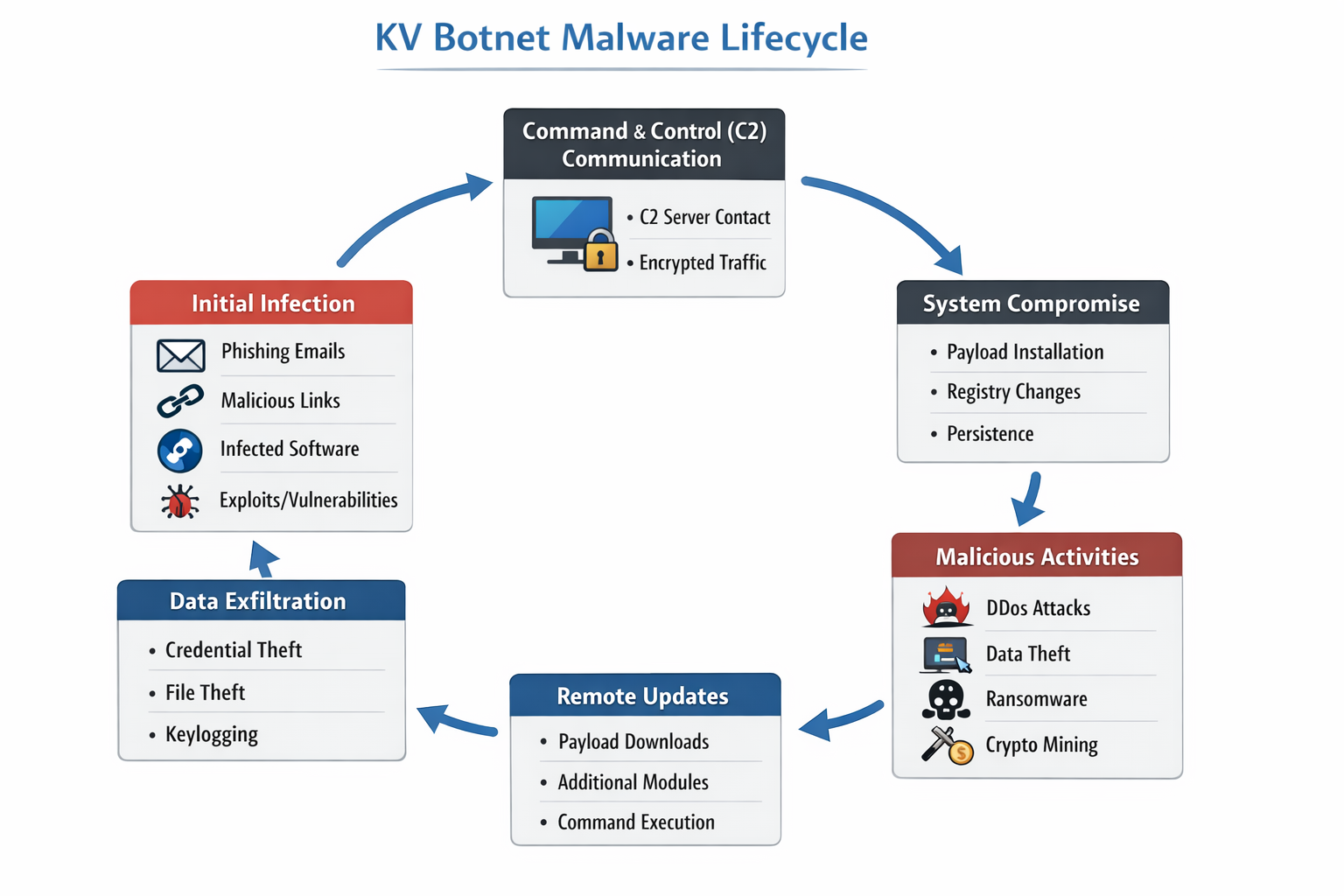
The KV Botnet Is An Emerging And Dangerous Form Of Malware That Has Gained Attention In The Cybersecurity Landscape Due To Its Stealthy Infection Methods, Command-and-control (C2) Architecture, And Ability To Compromise Large Numbers Of Devices Simultaneously. Botnets Like KV Botnet Are Primarily Designed To Give Attackers Remote Control Over Infected Systems, Allowing Them To Conduct Malicious Activities Such As Distributed Denial-of-service (DDoS) Attacks, Data Theft, Credential Harvesting, Spam Campaigns, And Malware Propagation. As Cyber Threats Continue To Evolve, Understanding KV Botnet Is Critical For Individuals, Organizations, And Security Professionals.

KV Botnet Typically Targets Windows-based Systems, Though Variants May Also Attempt To Exploit Vulnerable IoT Devices And Poorly Secured Network Services. Once A System Is Compromised, It Becomes Part Of A Botnet—a Network Of Infected Machines Controlled By A Remote Attacker. These Compromised Systems, Often Referred To As “zombies,” Operate Silently In The Background, Making Detection Difficult Without Advanced Security Tools.
KV Botnet Is A malware-based Botnet Framework That Enables Attackers To Remotely Execute Commands On Infected Systems. The Name “KV” Is Often Associated With Internal Identifiers Used By Threat Actors Or Malware Developers Rather Than A Legitimate Software Component. Like Many Modern Botnets, KV Botnet Employs Obfuscation Techniques, Encrypted Communication, And Persistence Mechanisms To Evade Antivirus Detection And Remain Active For Long Periods.
The Botnet Operates By Installing A Malicious Payload On The Victim’s Machine, Which Then Connects Back To A Command-and-control Server. Through This Server, Attackers Can Issue Instructions Such As Downloading Additional Malware, Launching Attacks On External Targets, Or Exfiltrating Sensitive Information. Due To Its Modular Design, KV Botnet Can Be Updated Remotely, Allowing Attackers To Add New Capabilities Without Reinfecting The System.
KV Botnet Infections Commonly Begin Through malicious Links, phishing Emails, infected Software Installers, Or exploited Vulnerabilities In Outdated Operating Systems And Applications. Users May Unknowingly Download The Malware By Clicking On Deceptive Advertisements, Fake Update Prompts, Or Pirated Software Packages. In Enterprise Environments, Weak Passwords And Exposed Remote Desktop Protocol (RDP) Services Are Frequent Entry Points.
Once Executed, The Malware Copies Itself Into System Directories Such As AppData, ProgramData, Or System32, Often Using Deceptive File Names To Blend In With Legitimate Windows Files. It May Also Modify Windows Registry Keys To Ensure Persistence After Reboot. Some Variants Disable System Security Features Or Add Exclusions To Antivirus Software, Further Increasing Their Survival Rate.
A Defining Characteristic Of KV Botnet Is Its command-and-control Communication Model. After Infection, The Malware Establishes Outbound Connections To Attacker-controlled Servers Using HTTP, HTTPS, Or Custom TCP Protocols. These Communications Are Often Encrypted Or Encoded To Avoid Network-based Detection.
The C2 Servers Act As The Brain Of The Botnet, Allowing Attackers To Manage Thousands Of Infected Systems From A Single Interface. Commands May Include Launching Coordinated DDoS Attacks, Scanning For Additional Vulnerable Hosts, Downloading Ransomware, Or Stealing Browser-stored Credentials. Some KV Botnet Samples Also Use Fallback C2 Domains Or Hardcoded IP Addresses To Maintain Connectivity If The Primary Server Is Taken Down.
KV Botnet Is Not Limited To A Single Type Of Attack. Instead, It Functions As A multi-purpose Malware Platform. One Of Its Most Common Uses Is Launching Large-scale DDoS Attacks Against Websites, Online Services, And Critical Infrastructure. By Leveraging The Combined Bandwidth And Processing Power Of Infected Machines, Attackers Can Overwhelm Targets And Cause Prolonged Service Outages.

In Addition To DDoS Functionality, KV Botnet Is Capable Of data Exfiltration, Including System Information, IP Addresses, Saved Browser Passwords, Cookies, And Login Credentials. Some Variants Also Act As Loaders, Downloading And Executing Secondary Payloads Such As Ransomware, Spyware, Or Cryptocurrency Miners. This Flexibility Makes KV Botnet Particularly Dangerous, As A Single Infection Can Lead To Multiple Stages Of Compromise.
KV Botnet Typically Creates Or Modifies Several Windows Files And Registry Entries To Maintain Persistence And Hide Its Presence. Common File Locations Include:
%AppData%\Local\
%ProgramData%\
%Temp%\
%System32%\
Malicious Executables May Use Names Resembling Legitimate System Files, Such As svchost.exe, winupdate.exe, Or systemsvc.exe. Registry Keys Are Often Added Under:
HKCU\Software\Microsoft\Windows\CurrentVersion\Run
HKLM\Software\Microsoft\Windows\CurrentVersion\Run
These Entries Ensure That The Botnet Payload Is Automatically Executed Whenever The System Starts, Making Manual Removal Difficult For Inexperienced Users.
KV Botnet Is Frequently Distributed Through unwanted And Malicious Links That Redirect Users To Exploit Kits, Fake Download Pages, Or Phishing Websites. These Links May Appear In Spam Emails, Social Media Messages, Cracked Software Forums, Or Malicious Advertisements. Examples Of Suspicious Link Characteristics Include Shortened URLs, Misspelled Domain Names, And Fake Security Warnings Urging Immediate Action.
Attackers Often Rotate Domains And IP Addresses To Avoid Blacklisting, Making It Harder For Traditional Security Solutions To Block Them Permanently. Clicking On These Unwanted Links Can Trigger Automatic Malware Downloads Or Redirect Users To Pages That Exploit Browser Vulnerabilities. Monitoring And Blocking Such Links At The Network Level Is A Key Defense Strategy Against KV Botnet Infections.
Infected Systems Communicating With KV Botnet C2 Servers Often Generate Unusual Outbound Traffic To suspicious IP Addresses Or Domains. These IPs May Be Hosted On Bulletproof Hosting Providers Or Compromised Servers In Multiple Geographic Locations. Network Indicators Include Repeated Beaconing At Fixed Intervals, Encrypted Payloads Over Non-standard Ports, And Connections To Newly Registered Domains.
Security Teams Can Use Intrusion Detection Systems (IDS) And Firewall Logs To Identify These Anomalies. Blocking Known Malicious IP Addresses And Monitoring DNS Requests For Suspicious Domains Can Significantly Reduce The Risk Of Botnet Communication.
The Impact Of KV Botnet Infections Can Be Severe. For Individual Users, The Malware May Result In Slow System Performance, Unauthorized Use Of Bandwidth, Identity Theft, Or Financial Loss. In Enterprise Environments, A Single Infected Endpoint Can Act As A Foothold For Broader Network Compromise, Leading To Data Breaches, Compliance Violations, And Reputational Damage.
Organizations May Also Face Legal And Regulatory Consequences If Compromised Systems Are Used To Attack Third Parties. Additionally, Botnet-related Downtime And Recovery Costs Can Be Substantial, Particularly For Small And Medium-sized Businesses With Limited Cybersecurity Resources.
Detecting KV Botnet Requires A Combination Of endpoint Security, network Monitoring, And behavioral Analysis. Traditional Signature-based Antivirus Solutions May Struggle Against Heavily Obfuscated Variants, Making Advanced Endpoint Detection And Response (EDR) Tools More Effective. Indicators Such As Unknown Startup Programs, Suspicious Registry Entries, And Unexplained Network Traffic Should Be Investigated Immediately.
Removal Typically Involves Isolating The Infected System From The Network, Terminating Malicious Processes, Deleting Associated Files, And Cleaning Registry Entries. In Severe Cases, A Complete Operating System Reinstallation May Be Necessary To Ensure Full Remediation. Keeping Systems Updated And Applying Security Patches Is Essential To Prevent Reinfection.
Preventing KV Botnet Infections Starts With user Awareness And Strong Security Hygiene. Users Should Avoid Clicking On Unknown Or Suspicious Links, Downloading Pirated Software, Or Opening Email Attachments From Untrusted Sources. Organizations Should Enforce Strong Password Policies, Disable Unnecessary Services, And Restrict RDP Access Using Firewalls And VPNs.
Deploying Reputable Security Software With Real-time Protection, Web Filtering, And Behavior-based Detection Can Significantly Reduce The Risk Of Botnet Infections. Regular Security Audits, Vulnerability Assessments, And Employee Training Programs Further Strengthen An Organization’s Defense Posture.
KV Botnet Represents A Serious And Evolving Cybersecurity Threat That Highlights The Importance Of Proactive Security Measures. Its Ability To Remain Hidden, Communicate With Remote C2 Servers, And Perform A Wide Range Of Malicious Activities Makes It A Powerful Tool For Cybercriminals. By Understanding How KV Botnet Operates, Recognizing Unwanted Links And Network Indicators, And Implementing Robust Security Practices, Individuals And Organizations Can Better Protect Themselves Against This Dangerous Malware.
Staying Informed About Emerging Botnets Like KV Botnet Is No Longer Optional—it Is A Necessity In Today’s Interconnected Digital World.
Step 1: Boot Into Safe Mode
Restart Your PC And Press F8 (or Shift + F8 For Some Systems) Before Windows Loads.
Choose Safe Mode With Networking.
Safe Mode Prevents Most Malware From Loading.
Press Win + R, Type appwiz.cpl, And Press Enter.
Sort By Install Date And Uninstall Unknown Or Recently Added Programs.
Use A Trusted Anti-malware Tool:
Malwarebytes – https://www.malwarebytes.com
Screenshot Of Malwarebytes - Visit Links
Microsoft Defender – Built Into Windows 10/11
HitmanPro, ESET Online Scanner, Or Kaspersky Virus Removal Tool
ZoneAlarm Pro Antivirus + Firewall NextGen
VIPRE Antivirus - US And Others Countries, | India
Run A Full Scan And Delete/quarantine Detected Threats.
Win + R, Type temp → Delete All Files.Press Win + R, Type %temp% → Delete All Files.
Use Disk Cleanup: cleanmgr In The Run Dialog.
Go To: C:\Windows\System32\drivers\etc
Open hosts File With Notepad.
Replace With Default Content:
Press Ctrl + Shift + Esc → Open Task Manager
Go To Startup Tab
Disable Any Suspicious Entries.
Open Command Prompt As Administrator.
Run These Commands:
netsh Winsock Reset

netsh Int Ip Reset

ipconfig /flushdns
Unwanted Homepage Or Search Engine
Pop-ups Or Redirects
Unknown Extensions Installed
For Chrome:
Go To: chrome://extensions/
Remove Anything Unfamiliar
For Firefox:
Go To: about:addons → Extensions
Remove Suspicious Add-ons
For Edge:
Go To: edge://extensions/
Uninstall Unknown Add-ons
Chrome:
Go To chrome://settings/reset → "Restore Settings To Their Original Defaults"
Firefox:
Go To about:support → "Refresh Firefox"
Edge:
Go To edge://settings/resetProfileSettings → "Reset Settings"
All Browsers:
Use Ctrl + Shift + Del → Select All Time
Clear Cookies, Cached Files, And Site Data
Make Sure They Are Not Hijacked.
Chrome: chrome://settings/search
Firefox: about:preferences#search
Edge: edge://settings/search
Chrome: chrome://settings/cleanup
Use Malwarebytes Browser Guard For Real-time Browser Protection.
Always Download Software From Trusted Sources.
Keep Windows, Browsers, And Antivirus Updated.
Avoid Clicking Suspicious Links Or Ads.
Use ad Blockers And reputable Antivirus Software.
Backup Your Files Regularly.
To Remove Malware From Your Windows PC, Start By Booting Into Safe Mode, Uninstalling Suspicious Programs, And Scanning With Trusted Anti-malware Tools Like Malwarebytes. Clear Temporary Files, Reset Your Network Settings, And Check Startup Apps For Anything Unusual.
For web Browsers, Remove Unwanted Extensions, Reset Browser Settings, Clear Cache And Cookies, And Ensure Your Homepage And Search Engine Haven’t Been Hijacked. Use Cleanup Tools Like Chrome Cleanup Or Browser Guard For Added Protection.
?? Prevention Tips: Keep Software Updated, Avoid Suspicious Downloads, And Use Antivirus Protection Plus Browser Ad Blockers. Regular Backups Are Essential.
Why It Matters: Not All VPNs Offer Malware Protection.
What To Look For: Providers With built-in Malware/ad/tracker Blockers (e.g., NordVPN’s Threat Protection, ProtonVPN’s NetShield).
Purpose: Prevents Data Leaks If Your VPN Connection Drops.
Benefit: Ensures Your Real IP And Browsing Activity Aren’t Exposed To Malware-distributing Websites.
Why It Matters: DNS Leaks Can Expose Your Online Activity To Attackers.
Solution: Enable DNS Leak Protection In Your VPN Settings Or Use A Secure DNS Like Cloudflare (1.1.1.1).
Risk: Free VPNs Often Contain Malware, Sell User Data, Or Lack Security Features.
Better Option: Use Reputable Paid VPNs That Offer security Audits And Transparent Privacy Policies.
Some VPNs Block Known Phishing And Malicious Sites.
Example: Surfshark’s CleanWeb, CyberGhost’s Content Blocker.
Reason: Security Patches Fix Known Vulnerabilities.
Tip: Enable Auto-updates Or Check For Updates Weekly.
Scope: Malware Can Enter Through Phones, Tablets, Or IoT Devices.
Solution: Install VPN Apps On Every Internet-connected Device.
Fact: VPNs Do Not Remove Or Detect Malware On Your System.
Complement It With:
Antivirus Software
Firewall
Browser Extensions For Script Blocking
VPN Encrypts Traffic But Can’t Stop Malware From Executing If You Download Infected Files.
Split Tunneling Allows Certain Apps/sites To Bypass VPN.
Tip: Never Exclude Browsers, Email Clients, Or Download Managers From VPN Tunneling.
A VPN (Virtual Private Network) Enhances Your Online Privacy By Encrypting Your Internet Traffic And Masking Your IP Address. It Protects Your Data On Public Wi-Fi, Hides Browsing Activity From Hackers And ISPs, And Helps Bypass Geo-restrictions. VPNs Also Add A Layer Of Defense Against Malware By Blocking Malicious Websites And Trackers When Using Advanced Features. However, A VPN Does Not Remove Existing Malware Or Act As Antivirus Software. For Full Protection, Combine VPN Use With Antivirus Tools, Regular Software Updates, And Cautious Browsing Habits. Always Choose A Reputable VPN Provider With Strong Security And Privacy Policies.
KV Botnet, KV Botnet Malware, KV Botnet Malware Lifecycle, Remove KV Botnet, Uninstall KV Botnet, Get Rid Of KV Botnet, KV Botnet Removal