 Blog's Page
 Blog's Page
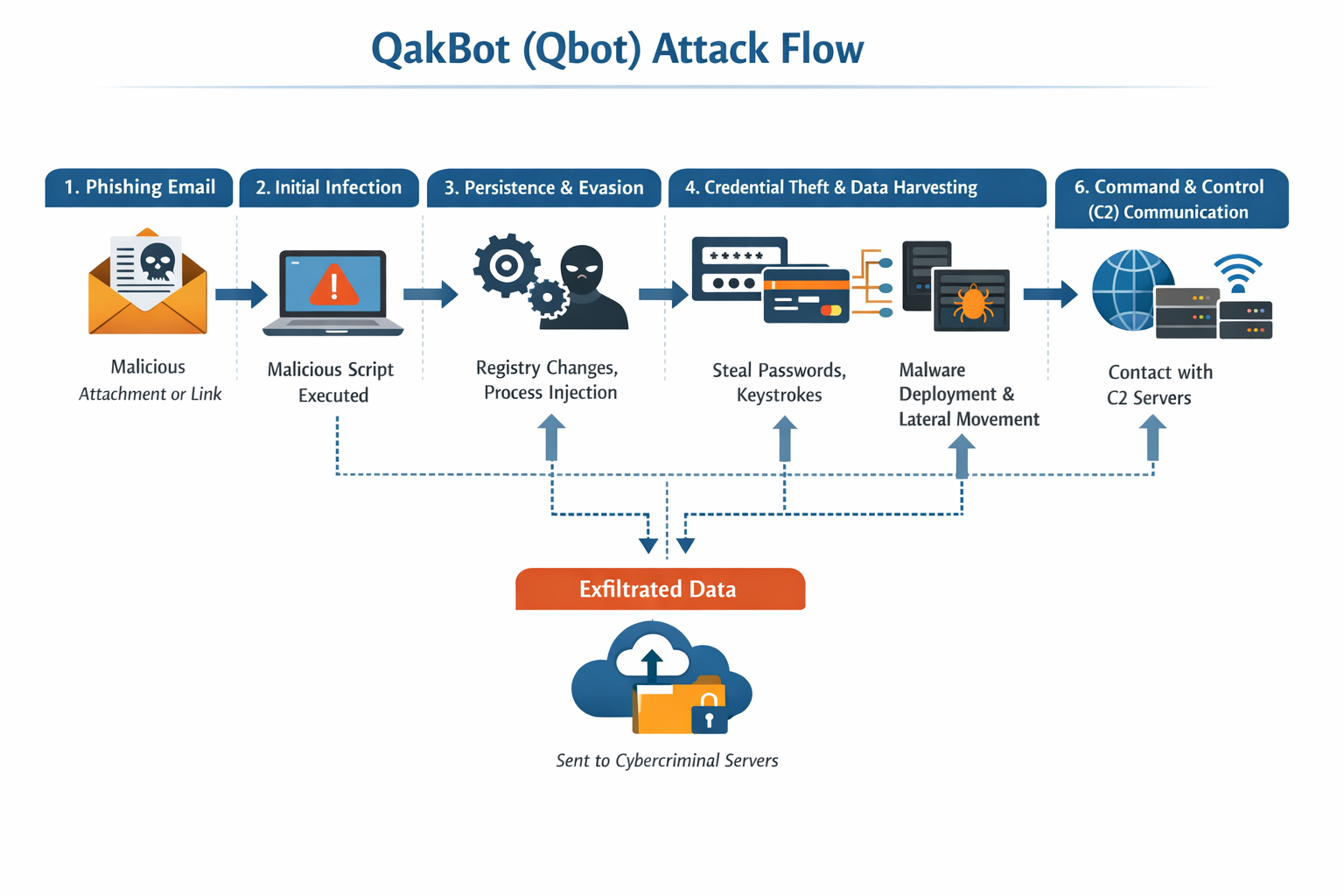
The QakBot Trojan, Also Known As Qbot Or Pinkslipbot, Is One Of The Most Persistent And Dangerous Malware Families In The Modern Cyber-threat Landscape. Originally Designed As A Banking Trojan To Steal Financial Credentials, QakBot Has Evolved Into A Multifunctional Malware Loader That Enables Ransomware Attacks, Data Exfiltration, Lateral Movement, And Long-term Network Persistence.
Over More Than A Decade Of Continuous Development, QakBot Has Become A Key Component Of Organized Cybercrime Operations, Frequently Used As An Initial Access Broker For Ransomware Groups Such As Conti, REvil, Egregor, Black Basta, And Others. Its Modular Architecture, Stealthy Infection Techniques, And Sophisticated Command-and-control (C2) Infrastructure Make It A High-risk Threat For Enterprises And Individuals Alike.
QakBot Primarily Spreads Through Large-scale Email Spam Campaigns That Deliver Malicious Attachments Or Links. These Phishing Emails Are Often Disguised As Legitimate Business Communications Such As Invoices, Shipping Notifications, Payment Confirmations, Or Internal Corporate Messages. In Many Cases, Attackers Hijack Real Email Threads Using Compromised Accounts, Making The Phishing Messages Appear Highly Authentic.
Victims Are Typically Tricked Into Opening Password-protected ZIP Files Or HTML Attachments That Lead To The Execution Of Malicious JavaScript, ISO, Or Excel Macro Files. Once Executed, The Malware Initiates A Multi-stage Infection Process That Ultimately Installs The Main QakBot Payload Into The System Memory, Making Detection And Forensic Analysis More Difficult.
After Successful Execution, QakBot Establishes Persistence By Modifying Windows Registry Keys, Scheduled Tasks, Or Startup Folders, Ensuring That It Launches Automatically After System Reboot. It Injects Itself Into Legitimate System Processes Such As Explorer.exe Or Svchost.exe To Evade Detection By Security Software.
QakBot Uses Advanced Anti-analysis Techniques Including Encrypted Configuration Files, Polymorphic Code, And Runtime Decryption, Which Helps It Bypass Traditional Signature-based Antivirus Solutions. Additionally, It Checks For Virtualized Environments And Sandbox Indicators To Avoid Execution During Malware Analysis, Further Complicating Detection By Security Researchers.
One Of The Most Dangerous Aspects Of QakBot Is Its Ability To Steal Sensitive Data From Infected Systems. It Contains Modules Capable Of Harvesting Browser-stored Credentials, Cookies, Autofill Data, And Session Tokens From Popular Browsers Such As Chrome, Edge, And Firefox. This Allows Attackers To Hijack Online Banking Sessions, Email Accounts, Social Media Profiles, And Enterprise Cloud Services.
QakBot Also Captures Keystrokes, Enabling It To Record Login Credentials, Financial Transactions, And Confidential Corporate Communications. The Stolen Data Is Encrypted And Transmitted To Remote C2 Servers Controlled By The Attackers, Where It Is Later Used For Financial Fraud, Identity Theft, And Further Cyberattacks.
Beyond Credential Theft, QakBot Functions As A Powerful Malware Delivery Platform. Once It Gains A Foothold In A Network, It Downloads And Executes Additional Payloads Based On Commands Received From Its Operators. These Payloads Often Include Ransomware, Cobalt Strike Beacons, Remote Access Trojans (RATs), And Data Exfiltration Tools.
This Makes QakBot A Preferred Choice For Ransomware Gangs Seeking Reliable Initial Access Into Corporate Networks. In Many Real-world Incidents, QakBot Infections Have Served As The First Stage Of Multi-million-dollar Ransomware Attacks That Resulted In Business Disruptions, Data Breaches, And Regulatory Penalties.
QakBot Is Also Known For Its Lateral Movement Capabilities, Which Allow It To Spread Across Internal Networks After Infecting One Machine. It Scans Local Subnets To Identify Other Vulnerable Devices And Attempts To Propagate Using Stolen Credentials, SMB Exploits, And Network Shares. By Harvesting Domain Credentials, QakBot Can Escalate Privileges And Compromise Critical Servers, Including File Servers And Domain Controllers. This Rapid Internal Spread Significantly Increases The Impact Of An Attack And Makes Incident Response More Complex, As Multiple Systems Must Be Isolated And Cleaned Simultaneously.
Another Notable Feature Of QakBot Is Its Use Of Dynamic Command-and-control Infrastructure. Instead Of Relying On A Small Number Of Fixed Servers, QakBot Maintains A Constantly Changing List Of C2 IP Addresses, Often Hosted On Compromised Servers Or Bulletproof Hosting Providers.
The Malware Communicates With These Servers Using Encrypted Traffic Over Standard Ports, Making It Difficult For Network Monitoring Tools To Distinguish Malicious Traffic From Legitimate Activity. In Some Versions, QakBot Also Uses Peer-to-peer Communication To Share Updated Server Lists And Configuration Data, Ensuring Resilience Even If Several C2 Servers Are Taken Down.
In Terms Of Technical Architecture, QakBot Operates As A Modular Malware Framework. The Core Loader Is Responsible For Initial Infection, Persistence, And Communication With C2 Servers, While Additional Modules Can Be Dynamically Downloaded And Executed Based On The Attacker’s Objectives. These Modules Include Credential Stealers, Network Scanners, Spam Propagation Tools, And Ransomware Droppers.
This Modular Design Allows Attackers To Customize Each Campaign, Adapting Quickly To Defensive Measures And Targeting Specific Industries Or Geographic Regions. Financial Institutions, Healthcare Organizations, Manufacturing Companies, And Educational Institutions Have All Been Frequent Targets Of QakBot Campaigns.
The Economic Motivation Behind QakBot Operations Is Primarily Driven By Cybercrime Monetization Strategies. Stolen Banking Credentials Are Used For Direct Financial Theft, Fraudulent Wire Transfers, And Money Mule Networks. Corporate Credentials Enable Business Email Compromise (BEC) Scams, Intellectual Property Theft, And Insider Trading.
When Ransomware Payloads Are Deployed, Attackers Demand Large Ransoms In Cryptocurrency In Exchange For Decryption Keys And Promises Not To Leak Stolen Data. In Many Cases, Victims Face Double Extortion, Where Attackers Threaten Both System Encryption And Public Data Exposure, Significantly Increasing Pressure To Pay The Ransom.
QakBot’s Long-term Success Can Be Attributed To Continuous Updates By Its Developers. The Malware Is Frequently Modified To Evade Detection, Bypass New Security Controls, And Exploit Emerging Vulnerabilities. It Regularly Changes Its File Hashes, Network Behavior, And Infection Vectors, Making It Difficult For Static Defenses To Keep Up.
Security Vendors Often Identify New Variants Of QakBot Within Weeks Of Previous Versions Being Blocked, Demonstrating An Active And Well-funded Development Operation Behind The Malware. This Adaptability Has Allowed QakBot To Remain Relevant Despite Multiple International Law Enforcement Efforts To Disrupt Its Infrastructure.
In 2023, Global Law Enforcement Agencies Conducted Coordinated Takedown Operations Aimed At Dismantling QakBot’s C2 Infrastructure. These Actions Temporarily Reduced Infection Rates And Disrupted Active Campaigns. However, Cybercriminals Quickly Adapted, And New Variants And Successor Botnets Emerged Using Similar Techniques.
This Highlights A Broader Cybersecurity Challenge: While Takedowns Can Reduce Short-term Threats, The Underlying Cybercrime Ecosystem Continues To Regenerate As Long As Financial Incentives Remain Strong. Organizations Must Therefore Rely On Proactive Security Strategies Rather Than Assuming That Specific Malware Families Have Been Permanently Eliminated.
From A Defensive Perspective, Preventing QakBot Infections Requires A Combination Of Technical Controls And User Awareness. Email Security Gateways Should Be Configured To Block Malicious Attachments, Detect Phishing URLs, And Scan Compressed Files For Embedded Scripts.
Disabling Macros By Default And Restricting Execution Of Script Files Can Significantly Reduce The Risk Of Infection. Endpoint Detection And Response (EDR) Solutions Are Essential For Identifying Suspicious Process Injections, Abnormal Network Connections, And Credential Dumping Behavior Associated With QakBot Activity. Regular Patching Of Operating Systems And Applications Also Reduces Opportunities For Exploitation During Lateral Movement.
Network Segmentation Plays A Critical Role In Limiting The Spread Of QakBot Within Enterprise Environments. By Isolating Critical Servers From User Workstations And Enforcing Strict Access Controls, Organizations Can Prevent Malware From Moving Laterally And Reaching High-value Assets. Monitoring Outbound Network Traffic For Unusual Encrypted Connections To Unknown IP Addresses Can Help Detect Early Stages Of C2 Communication.
Security Information And Event Management (SIEM) Systems, Combined With Threat Intelligence Feeds, Enable Faster Identification Of Known QakBot Indicators Of Compromise Such As Malicious IP Addresses, File Hashes, And Registry Modifications.
Incident Response Planning Is Equally Important In Mitigating The Damage Caused By QakBot Infections. Organizations Should Have Well-defined Procedures For Isolating Infected Machines, Resetting Compromised Credentials, And Restoring Systems From Clean Backups. Because QakBot Is Often Used As A Precursor To Ransomware, Rapid Response Is Critical To Prevent Attackers From Deploying Destructive Payloads.
Forensic Analysis Should Be Conducted To Determine The Extent Of Data Exfiltration And Whether Additional Backdoors Have Been Installed. In Regulated Industries, Breach Notification Requirements May Also Apply If Sensitive Customer Or Patient Data Has Been Compromised.
User Education Remains A Fundamental Layer Of Defense Against QakBot And Similar Threats. Employees Should Be Trained To Recognize Phishing Emails, Suspicious Attachments, And Unexpected Requests For Urgent Action. Simulated Phishing Campaigns Can Help Organizations Assess User Readiness And Reinforce Safe Email Practices.
Since QakBot Campaigns Often Exploit Real Email Threads, Users Must Be Cautious Even When Messages Appear To Come From Known Contacts. Verifying Unusual Requests Through Secondary Communication Channels Can Prevent Accidental Execution Of Malicious Files.
In The Broader Cybersecurity Ecosystem, QakBot Represents A Shift Toward Malware-as-a-service And Access-broker Business Models. Instead Of Focusing Solely On Financial Theft, Operators Now Specialize In Gaining Initial Access And Selling That Access To Other Criminal Groups Who Carry Out Ransomware Or Espionage Operations.
This Division Of Labor Increases Efficiency And Scalability For Cybercriminals, Making Threats More Organized And Harder To Dismantle. As A Result, Defending Against QakBot Is Not Just About Stopping One Trojan, But About Disrupting An Entire Chain Of Criminal Activity That Depends On Compromised Networks.
Looking Ahead, QakBot-style Malware Is Expected To Continue Evolving With New Social Engineering Techniques, Fileless Execution Methods, And Exploitation Of Trusted Cloud Services. Attackers Are Increasingly Using Legitimate Platforms Such As OneDrive, Google Drive, And Compromised Websites To Host Malware, Reducing The Effectiveness Of Traditional Blacklist-based Defenses.
Artificial Intelligence May Also Be Used By Attackers To Generate More Convincing Phishing Messages And Adapt Campaigns In Real Time. This Underscores The Need For Behavior-based Detection, Zero-trust Architectures, And Continuous Security Monitoring.
In Conclusion, The QakBot Trojan Is Far More Than A Simple Banking Malware; It Is A Sophisticated Cybercrime Platform That Enables Large-scale Financial Theft, Corporate Espionage, And Ransomware Attacks. Its Ability To Infiltrate Systems Through Phishing, Persist Silently, Steal Credentials, Move Laterally, And Deploy Additional Malware Makes It One Of The Most Dangerous Threats To Modern Digital Environments.
For Individuals, It Poses Risks Of Identity Theft And Financial Loss, While For Organizations, It Can Lead To Severe Operational Disruptions, Legal Liabilities, And Reputational Damage. Combating QakBot Requires Layered Security Defenses, Continuous User Education, And Rapid Incident Response Capabilities. As Cyber Threats Continue To Grow In Complexity, Understanding Malware Like QakBot Is Essential For Building Resilient Cybersecurity Strategies And Protecting Critical Digital Assets.
Step 1: Boot Into Safe Mode
Restart Your PC And Press F8 (or Shift + F8 For Some Systems) Before Windows Loads.
Choose Safe Mode With Networking.
Safe Mode Prevents Most Malware From Loading.
Press Win + R, Type appwiz.cpl, And Press Enter.
Sort By Install Date And Uninstall Unknown Or Recently Added Programs.
Use A Trusted Anti-malware Tool:
Malwarebytes – https://www.malwarebytes.com
Screenshot Of Malwarebytes - Visit Links
Microsoft Defender – Built Into Windows 10/11
HitmanPro, ESET Online Scanner, Or Kaspersky Virus Removal Tool
ZoneAlarm Pro Antivirus + Firewall NextGen
VIPRE Antivirus - US And Others Countries, | India
Run A Full Scan And Delete/quarantine Detected Threats.
Win + R, Type temp → Delete All Files.Press Win + R, Type %temp% → Delete All Files.
Use Disk Cleanup: cleanmgr In The Run Dialog.
Go To: C:\Windows\System32\drivers\etc
Open hosts File With Notepad.
Replace With Default Content:
Press Ctrl + Shift + Esc → Open Task Manager
Go To Startup Tab
Disable Any Suspicious Entries.
Open Command Prompt As Administrator.
Run These Commands:
netsh Winsock Reset

netsh Int Ip Reset

ipconfig /flushdns
Unwanted Homepage Or Search Engine
Pop-ups Or Redirects
Unknown Extensions Installed
For Chrome:
Go To: chrome://extensions/
Remove Anything Unfamiliar
For Firefox:
Go To: about:addons → Extensions
Remove Suspicious Add-ons
For Edge:
Go To: edge://extensions/
Uninstall Unknown Add-ons
Chrome:
Go To chrome://settings/reset → "Restore Settings To Their Original Defaults"
Firefox:
Go To about:support → "Refresh Firefox"
Edge:
Go To edge://settings/resetProfileSettings → "Reset Settings"
All Browsers:
Use Ctrl + Shift + Del → Select All Time
Clear Cookies, Cached Files, And Site Data
Make Sure They Are Not Hijacked.
Chrome: chrome://settings/search
Firefox: about:preferences#search
Edge: edge://settings/search
Chrome: chrome://settings/cleanup
Use Malwarebytes Browser Guard For Real-time Browser Protection.
Always Download Software From Trusted Sources.
Keep Windows, Browsers, And Antivirus Updated.
Avoid Clicking Suspicious Links Or Ads.
Use ad Blockers And reputable Antivirus Software.
Backup Your Files Regularly.
To Remove Malware From Your Windows PC, Start By Booting Into Safe Mode, Uninstalling Suspicious Programs, And Scanning With Trusted Anti-malware Tools Like Malwarebytes. Clear Temporary Files, Reset Your Network Settings, And Check Startup Apps For Anything Unusual.
For web Browsers, Remove Unwanted Extensions, Reset Browser Settings, Clear Cache And Cookies, And Ensure Your Homepage And Search Engine Haven’t Been Hijacked. Use Cleanup Tools Like Chrome Cleanup Or Browser Guard For Added Protection.
?? Prevention Tips: Keep Software Updated, Avoid Suspicious Downloads, And Use Antivirus Protection Plus Browser Ad Blockers. Regular Backups Are Essential.
Why It Matters: Not All VPNs Offer Malware Protection.
What To Look For: Providers With built-in Malware/ad/tracker Blockers (e.g., NordVPN’s Threat Protection, ProtonVPN’s NetShield).
Purpose: Prevents Data Leaks If Your VPN Connection Drops.
Benefit: Ensures Your Real IP And Browsing Activity Aren’t Exposed To Malware-distributing Websites.
Why It Matters: DNS Leaks Can Expose Your Online Activity To Attackers.
Solution: Enable DNS Leak Protection In Your VPN Settings Or Use A Secure DNS Like Cloudflare (1.1.1.1).
Risk: Free VPNs Often Contain Malware, Sell User Data, Or Lack Security Features.
Better Option: Use Reputable Paid VPNs That Offer security Audits And Transparent Privacy Policies.
Some VPNs Block Known Phishing And Malicious Sites.
Example: Surfshark’s CleanWeb, CyberGhost’s Content Blocker.
Reason: Security Patches Fix Known Vulnerabilities.
Tip: Enable Auto-updates Or Check For Updates Weekly.
Scope: Malware Can Enter Through Phones, Tablets, Or IoT Devices.
Solution: Install VPN Apps On Every Internet-connected Device.
Fact: VPNs Do Not Remove Or Detect Malware On Your System.
Complement It With:
Antivirus Software
Firewall
Browser Extensions For Script Blocking
VPN Encrypts Traffic But Can’t Stop Malware From Executing If You Download Infected Files.
Split Tunneling Allows Certain Apps/sites To Bypass VPN.
Tip: Never Exclude Browsers, Email Clients, Or Download Managers From VPN Tunneling.
A VPN (Virtual Private Network) Enhances Your Online Privacy By Encrypting Your Internet Traffic And Masking Your IP Address. It Protects Your Data On Public Wi-Fi, Hides Browsing Activity From Hackers And ISPs, And Helps Bypass Geo-restrictions. VPNs Also Add A Layer Of Defense Against Malware By Blocking Malicious Websites And Trackers When Using Advanced Features. However, A VPN Does Not Remove Existing Malware Or Act As Antivirus Software. For Full Protection, Combine VPN Use With Antivirus Tools, Regular Software Updates, And Cautious Browsing Habits. Always Choose A Reputable VPN Provider With Strong Security And Privacy Policies.
Qakbot Trojan, Remove Qakbot Trojan, Get Rid Of Qakbot Trojan, Qakbot Trojan Removal, Uninstall Qakbot Trojan