 Blog's Page
 Blog's Page
Raccoon Infostealer Malware Is One Of The Most Notorious Information-stealing Threats Observed In The Modern Cybercrime Ecosystem. Designed Primarily To Harvest Sensitive User Data Such As Login Credentials, Financial Information, Cookies, Cryptocurrency Wallets, And System Details, Raccoon Has Evolved Into A Highly Commercialized Malware-as-a-service (MaaS) Offering. Its Affordability, Modular Design, And Stealthy Execution Have Made It Popular Among Low-skill Cybercriminals As Well As Advanced Threat Actors. Over The Years, Raccoon Infostealer Has Been Linked To Large-scale Credential Theft Campaigns Affecting Individuals, Enterprises, And Government Institutions Worldwide.
First Discovered Around 2019, Raccoon Infostealer Quickly Gained Attention Due To Its Simplicity And Effectiveness. Unlike Complex Banking Trojans That Require Extensive Configuration, Raccoon Focuses On Speed And Volume. It Compromises Systems, Extracts Valuable Information, And Exfiltrates The Data To Command-and-control Servers Within Seconds. This Efficiency Has Allowed Attackers To Deploy It In Massive Phishing And Malvertising Campaigns, Resulting In Millions Of Stolen Credentials Circulating In Underground Forums And Dark Web Marketplaces.
From An SEO Perspective, Raccoon Infostealer Remains A Highly Searched Topic Because Of Its Continuous Resurfacing In Threat Reports, Data Breach Investigations, And Malware Takedown Operations. Despite Multiple Law Enforcement Disruptions, Newer Variants And Forks Of Raccoon Continue To Emerge, Demonstrating The Resilience Of Cybercrime-as-a-business Models.
Raccoon Infostealer Is Primarily Written In C++ And Distributed As A Lightweight Executable, Often Packed Or Obfuscated To Evade Detection By Antivirus Solutions. Once Executed On A Victim System, The Malware Performs An Initial Environment Check To Ensure It Is Not Running In A Sandbox Or Virtual Machine. This Anti-analysis Capability Allows Raccoon To Avoid Automated Malware Detection Systems Commonly Used By Security Researchers.
After Successful Execution, The Malware Establishes Persistence In Some Campaigns, Although Many Raccoon Infections Are Designed To Be Short-lived And “hit-and-run” In Nature. Its Primary Goal Is Data Theft Rather Than Long-term Control. Raccoon Collects Information From Popular Web Browsers Such As Google Chrome, Mozilla Firefox, Microsoft Edge, Brave, And Opera. It Extracts Saved Usernames, Passwords, Autofill Data, Browsing History, Cookies, And Session Tokens, Enabling Attackers To Bypass Multi-factor Authentication In Certain Scenarios.
In Addition To Browser Data, Raccoon Infostealer Targets Cryptocurrency Wallets Including Bitcoin, Ethereum, Litecoin, And Various Browser-based Wallet Extensions. The Malware Scans System Directories For Wallet Files And Configuration Data, Making It Particularly Dangerous For Users Involved In Cryptocurrency Trading And Decentralized Finance Platforms.
System Information Such As IP Address, Geolocation, Operating System Version, Installed Software, And Hardware Identifiers Is Also Collected. This Data Helps Attackers Profile Victims, Prioritize High-value Targets, And Sell Categorized Logs On Underground Markets.
Raccoon Infostealer Is Commonly Distributed Through Phishing Emails, Cracked Software Downloads, Malicious Advertisements, And Exploit Kits. Phishing Campaigns Often Impersonate Legitimate Organizations, Software Vendors, Or Financial Institutions, Tricking Users Into Opening Malicious Attachments Or Clicking Infected Links. These Attachments May Appear As Invoices, Shipping Notifications, Job Offers, Or Urgent Security Alerts.
Another Major Distribution Channel Is Software Piracy Websites. Users Searching For Cracked Versions Of Commercial Software Frequently Download Installers Bundled With Raccoon Infostealer. Since The Malware Is Lightweight And Executes Quickly, Victims May Not Notice Any Immediate Performance Issues, Allowing The Infection To Remain Undetected Until Their Accounts Are Compromised.
Malvertising Campaigns Have Also Played A Significant Role In Raccoon’s Spread. Attackers Inject Malicious Ads Into Legitimate Websites Or Compromise Ad Networks, Redirecting Users To Fake Update Pages Or Exploit Landing Sites. These Pages Often Mimic Browser Update Notifications Or Popular Application Installers, Increasing The Likelihood Of Successful Infection.
Once Raccoon Infostealer Completes Data Collection, It Compresses And Encrypts The Stolen Information Before Sending It To A Remote Command-and-control (C2) Server. Communication Typically Occurs Over HTTP Or HTTPS, Often Using Hardcoded IP Addresses Or Dynamically Resolved Domains. Some Variants Use Telegram Bots Or Cloud-based Services As Intermediate Exfiltration Channels To Evade Traditional Network-based Detection.
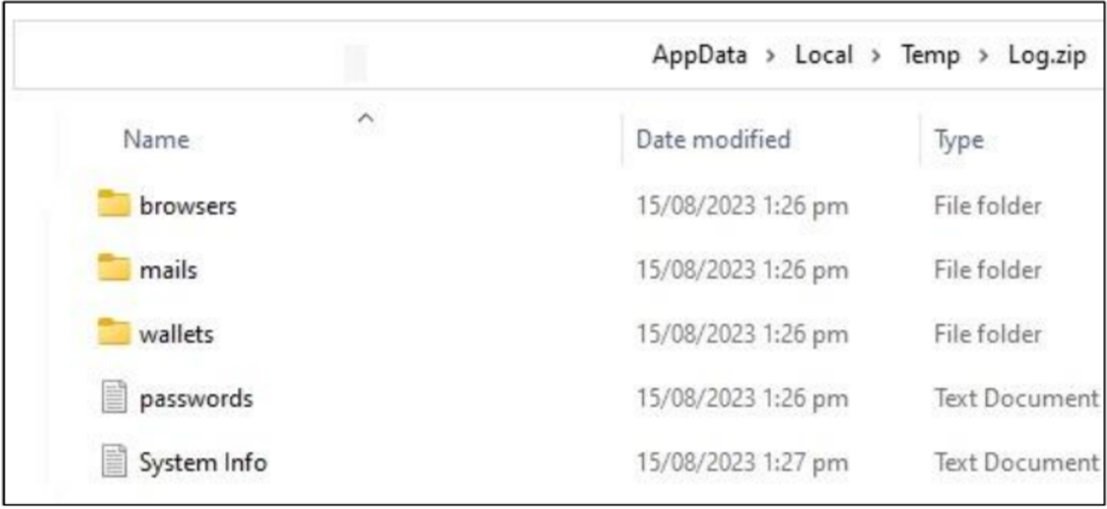
The Stolen Data, Commonly Referred To As “logs,” Is Organized Into Structured Archives Containing Browser Credentials, Cookies, Wallet Data, Screenshots, And System Metadata. These Logs Are Then Made Available To The Malware Operator Through A Web-based Control Panel. From There, Attackers May Exploit The Data Themselves Or Sell It On Dark Web Marketplaces, Where Prices Vary Based On The Victim’s Location, Account Types, And Financial Potential.
One Of The Key Reasons Behind Raccoon Infostealer’s Widespread Adoption Is Its MaaS Business Model. Cybercriminals Can Rent Access To The Malware For A Relatively Low Subscription Fee, Often Paid In Cryptocurrency. This Lowers The Barrier To Entry For Aspiring Attackers Who Lack The Technical Skills To Develop Their Own Malware.
The MaaS Model Typically Includes A User-friendly Dashboard, Regular Updates, Technical Support, And Documentation. Some Versions Of Raccoon Even Offer Customization Options, Allowing Buyers To Configure Data Collection Modules, Target Regions, And Delivery Methods. This Commercialization Of Malware Has Significantly Contributed To The Scale And Frequency Of Infostealer Campaigns Globally.
The Consequences Of A Raccoon Infostealer Infection Can Be Severe. For Individuals, Stolen Credentials May Lead To Account Takeovers, Identity Theft, Financial Fraud, And Loss Of Cryptocurrency Assets. Compromised Email Accounts Can Be Used For Further Phishing Attacks, While Social Media Accounts May Be Abused For Scams And Misinformation Campaigns.
For Organizations, Raccoon Infections Pose A Serious Security Risk. Stolen Corporate Credentials Can Provide Attackers With Access To Internal Systems, Cloud Services, And VPNs. In Many Cases, Infostealer-harvested Credentials Are Used As The Initial Access Vector For Larger Cyberattacks, Including Ransomware Deployments And Data Breaches. Thus, Raccoon Infostealer Often Plays A Critical Role In The Early Stages Of The Cyber Kill Chain.
Detecting Raccoon Infostealer Is Challenging Due To Its Lightweight Footprint And Short Execution Time. Traditional Signature-based Antivirus Solutions May Fail To Identify New Or Obfuscated Variants. Additionally, Since The Malware Does Not Always Establish Persistence, Forensic Evidence May Be Limited After Execution.
Behavior-based Detection, Endpoint Detection And Response (EDR) Solutions, And Network Traffic Analysis Are More Effective In Identifying Infostealer Activity. Indicators Such As Unusual Process Execution, Suspicious Outbound Connections, Credential Dumping Behavior, And Unauthorized Access Attempts Can Help Security Teams Detect Infections Early.
Memory Analysis And Sandbox Detonation Are Commonly Used By Malware Analysts To Study Raccoon Samples. Reverse Engineering Has Revealed Multiple Iterations Of The Malware, Each Improving Evasion Techniques And Data Collection Efficiency.
Preventing Raccoon Infostealer Infections Requires A Multi-layered Cybersecurity Approach. User Awareness And Training Play A Crucial Role, As Phishing Remains The Primary Infection Vector. Educating Users To Recognize Suspicious Emails, Attachments, And Download Sources Can Significantly Reduce Infection Rates.
Endpoint Security Solutions With Real-time Behavior Monitoring Are Essential For Detecting Infostealers. Regular Software Updates And Patch Management Help Minimize Exploitation Risks. Organizations Should Enforce Strong Password Policies, Enable Multi-factor Authentication, And Monitor For Leaked Credentials On Dark Web Platforms.
Network Segmentation And Least-privilege Access Controls Can Limit The Damage Caused By Compromised Credentials. Incident Response Plans Should Include Procedures For Credential Resets, System Isolation, And Forensic Investigation In The Event Of An Infostealer Infection.
Despite Law Enforcement Efforts To Dismantle Raccoon’s Infrastructure, The Malware Continues To Evolve. New Versions And Rebranded Variants Regularly Appear, Often Incorporating Lessons Learned From Previous Takedowns. This Highlights A Broader Trend In Cybercrime, Where Malware Families Adapt Rapidly To Disruption Efforts.
Raccoon Infostealer’s Persistence Underscores The Growing Threat Posed By Credential-stealing Malware In An Increasingly Digital World. As More Services Move Online And Users Manage Multiple Accounts Across Platforms, The Value Of Stolen Credentials Continues To Rise, Fueling Demand For Infostealer Tools.
Raccoon Infostealer Malware Represents A Significant And Ongoing Threat In The Cybersecurity Landscape. Its Ease Of Use, Affordability, And Effectiveness Have Made It A Preferred Tool For Cybercriminals Seeking To Harvest Sensitive Data At Scale. By Understanding Its Behavior, Infection Vectors, And Impact, Individuals And Organizations Can Take Proactive Steps To Defend Against This Dangerous Malware.
As Cyber Threats Continue To Evolve, Combating Infostealers Like Raccoon Requires Continuous Vigilance, Advanced Security Technologies, And Informed Users. Addressing This Threat Is Not Only About Preventing Individual Infections But Also About Disrupting The Broader Cybercriminal Economy That Thrives On Stolen Information.
Step 1: Boot Into Safe Mode
Restart Your PC And Press F8 (or Shift + F8 For Some Systems) Before Windows Loads.
Choose Safe Mode With Networking.
Safe Mode Prevents Most Malware From Loading.
Press Win + R, Type appwiz.cpl, And Press Enter.
Sort By Install Date And Uninstall Unknown Or Recently Added Programs.
Use A Trusted Anti-malware Tool:
Malwarebytes – https://www.malwarebytes.com
Screenshot Of Malwarebytes - Visit Links
Microsoft Defender – Built Into Windows 10/11
HitmanPro, ESET Online Scanner, Or Kaspersky Virus Removal Tool
ZoneAlarm Pro Antivirus + Firewall NextGen
VIPRE Antivirus - US And Others Countries, | India
Run A Full Scan And Delete/quarantine Detected Threats.
Win + R, Type temp → Delete All Files.Press Win + R, Type %temp% → Delete All Files.
Use Disk Cleanup: cleanmgr In The Run Dialog.
Go To: C:\Windows\System32\drivers\etc
Open hosts File With Notepad.
Replace With Default Content:
Press Ctrl + Shift + Esc → Open Task Manager
Go To Startup Tab
Disable Any Suspicious Entries.
Open Command Prompt As Administrator.
Run These Commands:
netsh Winsock Reset

netsh Int Ip Reset

ipconfig /flushdns
Unwanted Homepage Or Search Engine
Pop-ups Or Redirects
Unknown Extensions Installed
For Chrome:
Go To: chrome://extensions/
Remove Anything Unfamiliar
For Firefox:
Go To: about:addons → Extensions
Remove Suspicious Add-ons
For Edge:
Go To: edge://extensions/
Uninstall Unknown Add-ons
Chrome:
Go To chrome://settings/reset → "Restore Settings To Their Original Defaults"
Firefox:
Go To about:support → "Refresh Firefox"
Edge:
Go To edge://settings/resetProfileSettings → "Reset Settings"
All Browsers:
Use Ctrl + Shift + Del → Select All Time
Clear Cookies, Cached Files, And Site Data
Make Sure They Are Not Hijacked.
Chrome: chrome://settings/search
Firefox: about:preferences#search
Edge: edge://settings/search
Chrome: chrome://settings/cleanup
Use Malwarebytes Browser Guard For Real-time Browser Protection.
Always Download Software From Trusted Sources.
Keep Windows, Browsers, And Antivirus Updated.
Avoid Clicking Suspicious Links Or Ads.
Use ad Blockers And reputable Antivirus Software.
Backup Your Files Regularly.
To Remove Malware From Your Windows PC, Start By Booting Into Safe Mode, Uninstalling Suspicious Programs, And Scanning With Trusted Anti-malware Tools Like Malwarebytes. Clear Temporary Files, Reset Your Network Settings, And Check Startup Apps For Anything Unusual.
For web Browsers, Remove Unwanted Extensions, Reset Browser Settings, Clear Cache And Cookies, And Ensure Your Homepage And Search Engine Haven’t Been Hijacked. Use Cleanup Tools Like Chrome Cleanup Or Browser Guard For Added Protection.
?? Prevention Tips: Keep Software Updated, Avoid Suspicious Downloads, And Use Antivirus Protection Plus Browser Ad Blockers. Regular Backups Are Essential.
Why It Matters: Not All VPNs Offer Malware Protection.
What To Look For: Providers With built-in Malware/ad/tracker Blockers (e.g., NordVPN’s Threat Protection, ProtonVPN’s NetShield).
Purpose: Prevents Data Leaks If Your VPN Connection Drops.
Benefit: Ensures Your Real IP And Browsing Activity Aren’t Exposed To Malware-distributing Websites.
Why It Matters: DNS Leaks Can Expose Your Online Activity To Attackers.
Solution: Enable DNS Leak Protection In Your VPN Settings Or Use A Secure DNS Like Cloudflare (1.1.1.1).
Risk: Free VPNs Often Contain Malware, Sell User Data, Or Lack Security Features.
Better Option: Use Reputable Paid VPNs That Offer security Audits And Transparent Privacy Policies.
Some VPNs Block Known Phishing And Malicious Sites.
Example: Surfshark’s CleanWeb, CyberGhost’s Content Blocker.
Reason: Security Patches Fix Known Vulnerabilities.
Tip: Enable Auto-updates Or Check For Updates Weekly.
Scope: Malware Can Enter Through Phones, Tablets, Or IoT Devices.
Solution: Install VPN Apps On Every Internet-connected Device.
Fact: VPNs Do Not Remove Or Detect Malware On Your System.
Complement It With:
Antivirus Software
Firewall
Browser Extensions For Script Blocking
VPN Encrypts Traffic But Can’t Stop Malware From Executing If You Download Infected Files.
Split Tunneling Allows Certain Apps/sites To Bypass VPN.
Tip: Never Exclude Browsers, Email Clients, Or Download Managers From VPN Tunneling.
A VPN (Virtual Private Network) Enhances Your Online Privacy By Encrypting Your Internet Traffic And Masking Your IP Address. It Protects Your Data On Public Wi-Fi, Hides Browsing Activity From Hackers And ISPs, And Helps Bypass Geo-restrictions. VPNs Also Add A Layer Of Defense Against Malware By Blocking Malicious Websites And Trackers When Using Advanced Features. However, A VPN Does Not Remove Existing Malware Or Act As Antivirus Software. For Full Protection, Combine VPN Use With Antivirus Tools, Regular Software Updates, And Cautious Browsing Habits. Always Choose A Reputable VPN Provider With Strong Security And Privacy Policies.
Raccoon Infostealer, Raccoon Malware, Raccoon Stealer Virus, Raccoon Infostealer Malware, Information Stealer Malware, Credential Stealing Malware, Br